
Dog Pedigree Software: What to Record, How Deep, and How to Share It
By Kenny SchultzLast reviewed
Dog pedigree software records each dog's sire and dam and follows them back, so an ancestor entered once appears in every pedigree it belongs to. In BreederBuddy you link your own dogs, import paper pedigrees from a photo or PDF, add outside ancestors, view 3 to 6 generations with a pedigree COI, and share a link or print a PDF.
Key takeaways
- Enter every ancestor by registered name and registration number exactly as printed, so the same dog never becomes two records.
- Build each breeding dog's pedigree once; every puppy linked to that sire and dam inherits both sides.
- Treat a pedigree COI as a floor: missing ancestors count as unrelated, so fill in as many generations as your papers allow.
- Check ancestors' health clearances in the OFA database, and remember a missing result is not a clear result.
- Share pedigrees as a link or a PDF, and order a certified pedigree from the registry when a buyer needs official paperwork.
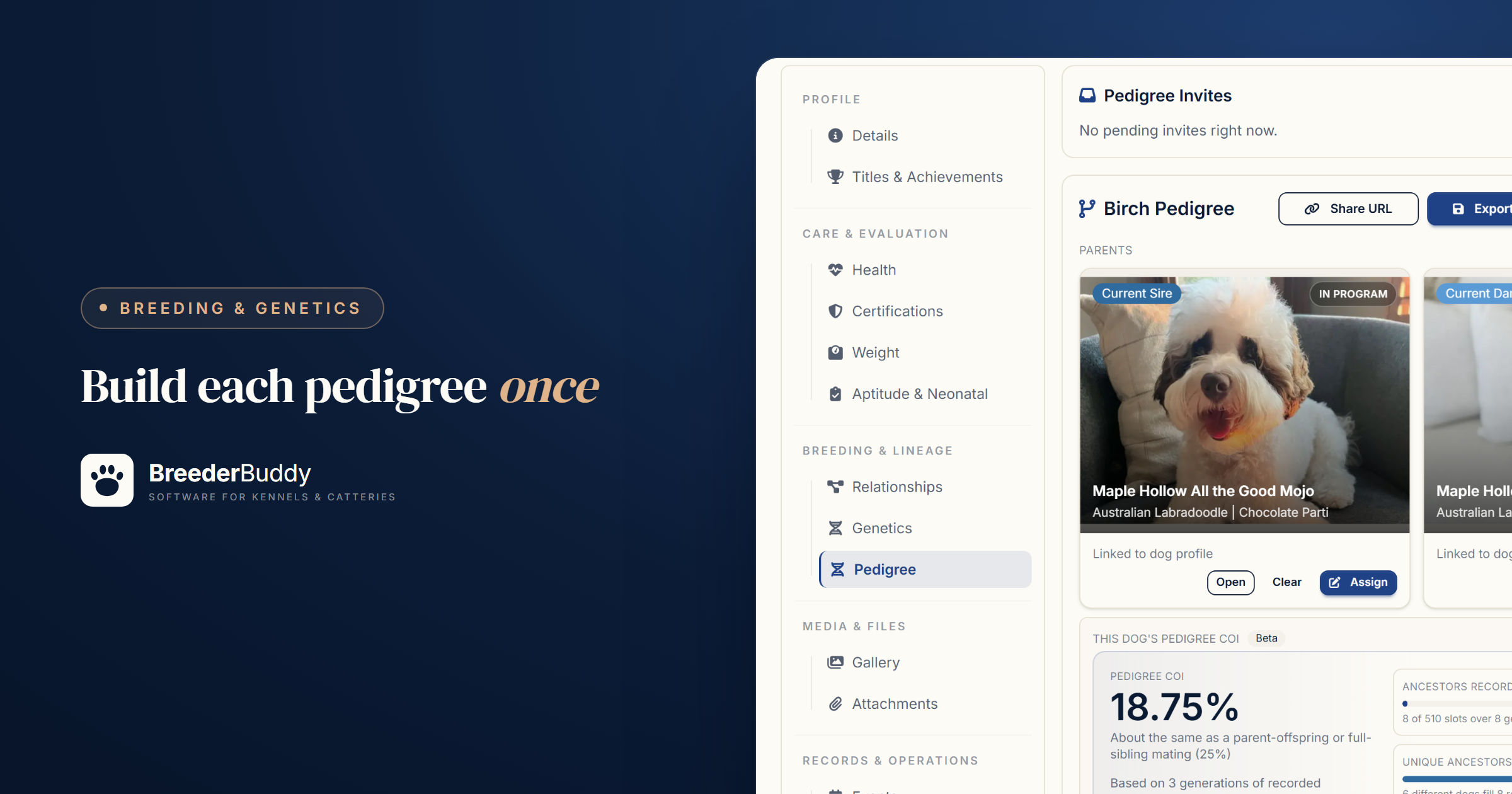
Dog pedigree software keeps each dog's sire and dam on its record and follows those links back through the generations, so an ancestor you enter once appears in every pedigree that includes it. Done well, it gives you one family tree to check before a breeding, send to a buyer and print for a puppy packet.
Paper and spreadsheets work until the same grandsire gets typed two ways, or a buyer asks about the dam's side and the certificate is at home. Below: what a working pedigree holds, and how BreederBuddy builds, checks and shares one.
What a pedigree should record, and how deep
A useful pedigree records who each ancestor is (registered name and number), then what that dog proved (titles and health clearances), for as many generations as you can document.
| What to record | Where it comes from | Why it matters |
|---|---|---|
| Registered name, exactly as printed | Papers or a certified pedigree | How registries and health databases find the dog |
| Registration number | Registration papers | Two dogs can share a name; numbers don't |
| Titles | Certified pedigree, show and event results | What the line has proven |
| Color, date of birth, breeder | Papers, or the dog's breeder | Telling similar names apart |
| Health clearances | The OFA database, DNA test reports | What each side was tested for |
Names and titles. Copy the registered name exactly, kennel prefix and all, and keep the call name separate. Pick one rule for titles (as printed on the papers is easiest) and stick to it, because inconsistent titles are how one dog turns into two records.
Health clearances on ancestors. Every normal result submitted to OFA is public in its online database, so you can check a grandsire before you breed to his son. For many tests, though, the owner decides whether an abnormal result goes public, and a CHIC number means the breed's required tests were done and released, not that every result was normal. A missing result is not a clear result, so ask the owner for copies.
How many generations to keep
Keep at least the four generations an AKC certified pedigree shows, and more when you can. Four generations hold 30 ancestors, five hold 62 and six hold 126, and many of them belong to other breeders. Depth matters most for breeding decisions: a coefficient of inbreeding only counts the common ancestors you've recorded, so a great-great-grandsire shared by both sides doesn't show on a three-generation pedigree. When you buy a dog or use an outside stud, ask for the deepest pedigree the owner has.
Step 1: Link parents between your own dogs
A pedigree is each dog's sire and dam followed back, so it starts with your own dogs.
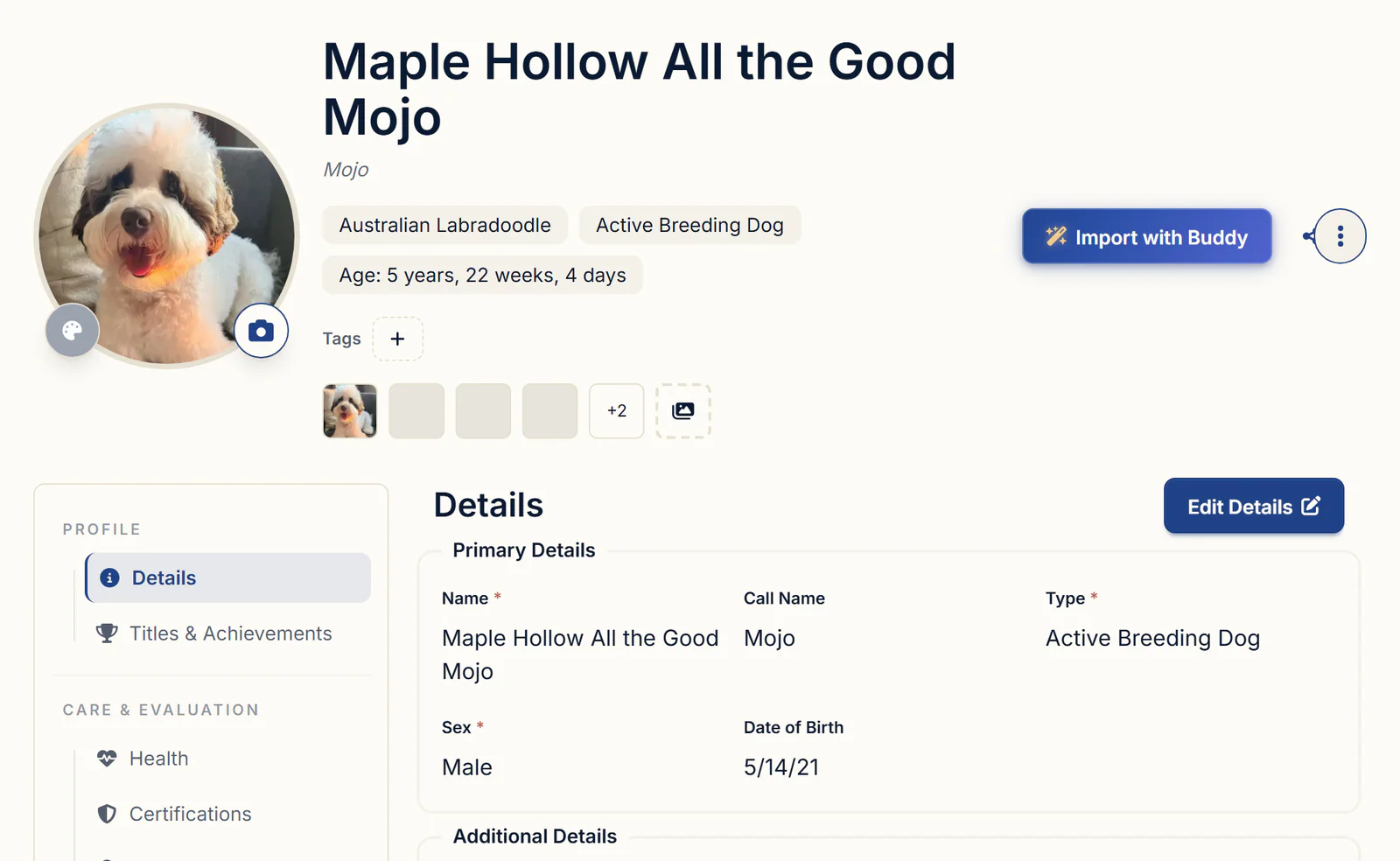
- Open the dog from Dogs and click Edit Details. Put the registered name in Name, the everyday name in Call Name, and fill in the two registration number fields. You can rename those fields for your registries in Settings, under Preferences.
- Under Relationships, pick the Sire and Dam and click Save. The lists show dogs of the right sex whose Type is Active Breeding Dog, Retired or Deceased, so mark a dog who has died Deceased rather than deleting her.
- Repeat for each parent, back as far as your own dogs go.
Your own dogs keep titles on the Titles & Achievements tab (Add title) and health results on the Certifications tab, where the import button reads an OFA certificate PDF and fills in the test, result, certificate number and dates for you to check. What else to keep on each dog is in dog breeding record keeping software.
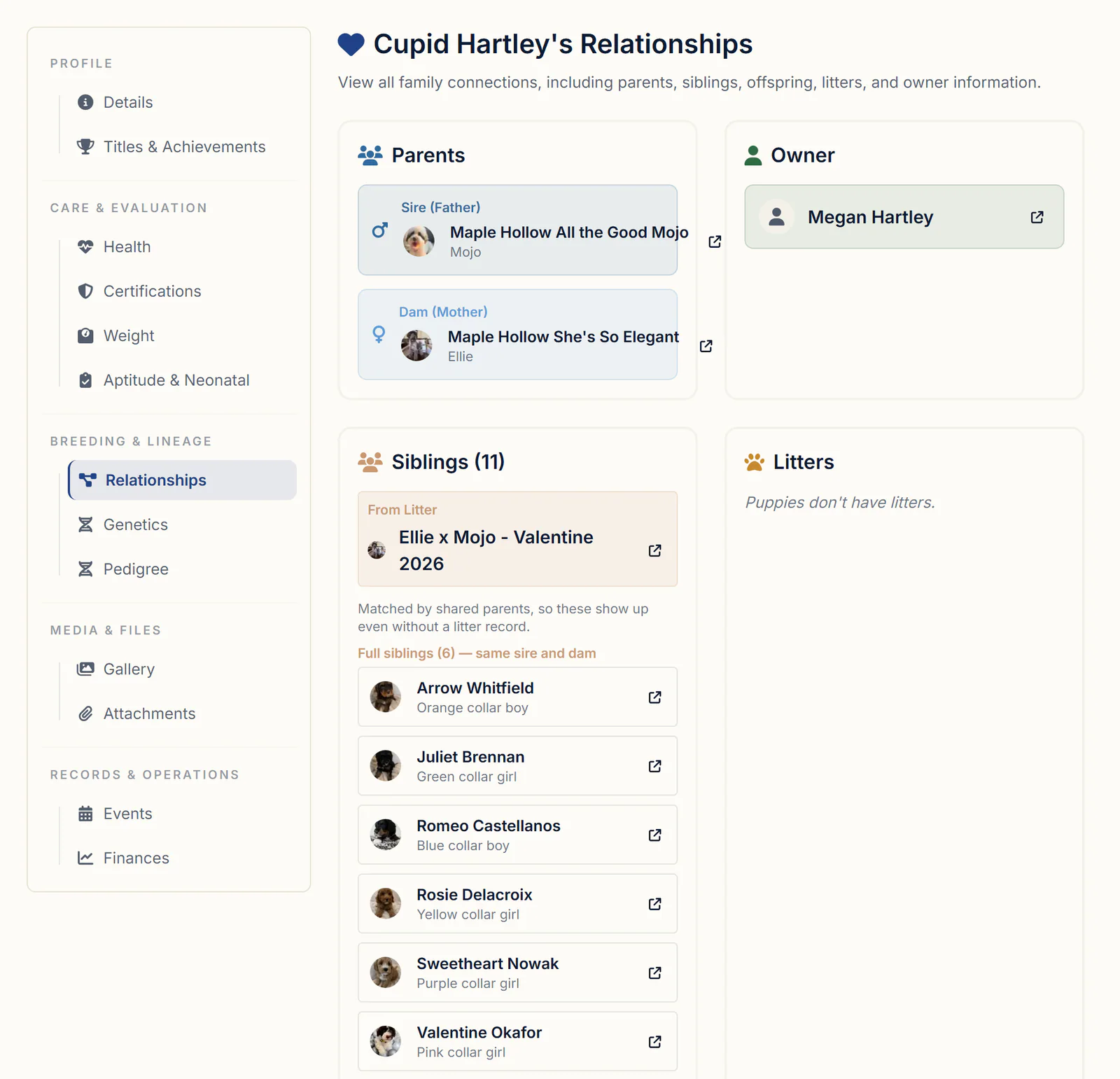
Puppies you add from a litter with Add New Puppy get the litter's sire and dam, locked on the puppy, and its birth date. That's how the sire's and dam's pedigrees combine: build each parent's once, and every puppy from the pairing inherits both sides. Entered a puppy before its litter? Link Existing Puppy, in the Toolbox on the litter's Puppies tab, moves it into the litter and sets its parents and birth date to match. The puppy's Relationships tab then lists its parents, its owner, and its full and half siblings.
Step 2: Import a pedigree from a photo or PDF
If the pedigree exists on paper, Buddy can read a photo or PDF of the chart and build the tree for you to check, so you don't type 30 ancestors by hand.
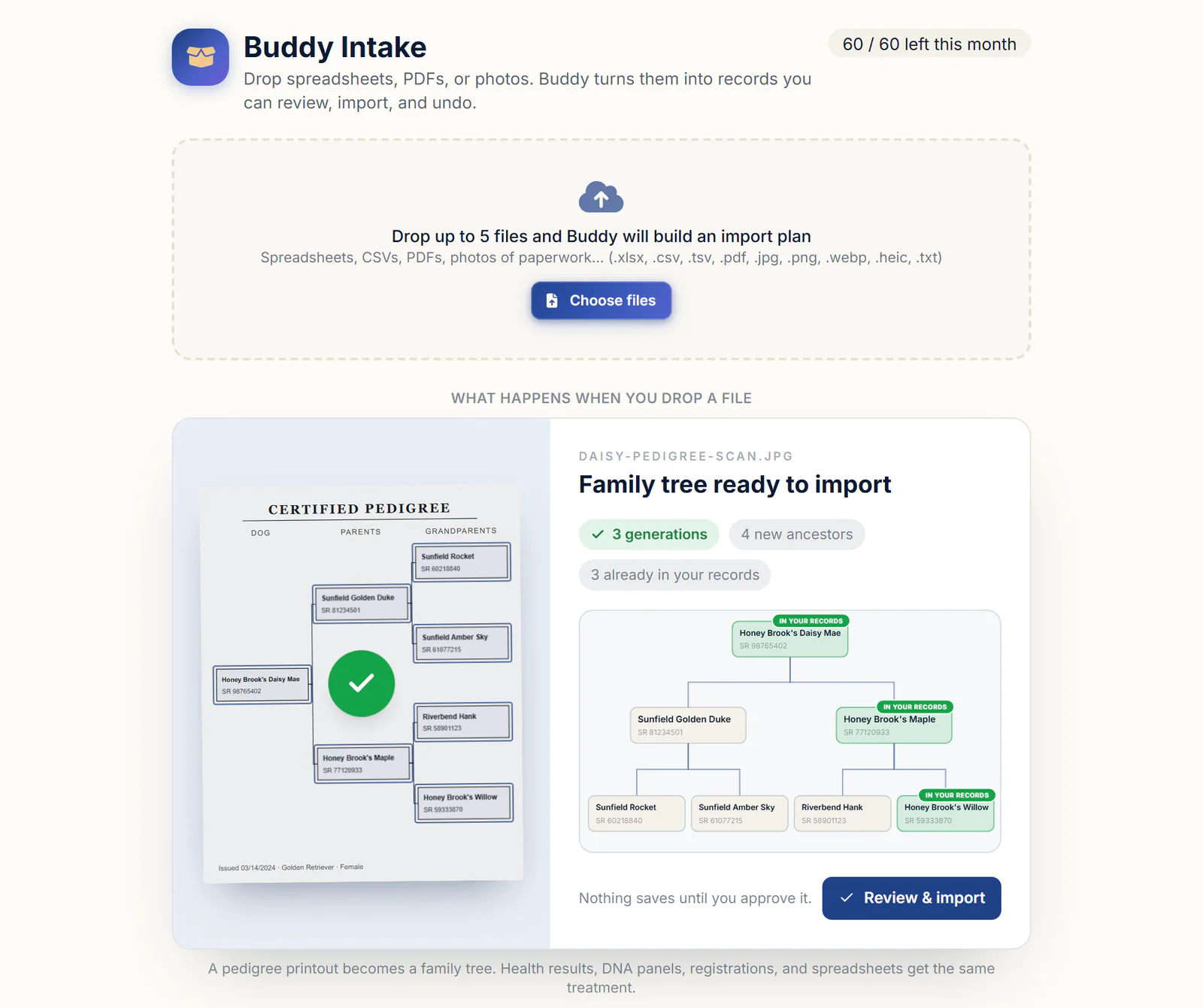
- Open Buddy Intake in the left menu, or click Import with Buddy at the top of a dog's profile.
- Drop in the chart, up to 5 files at a time: a registry certificate, a stud owner's PDF or a phone photo.
- Review the tree, laid out like the chart. Dogs you already have are matched by registration number or name. Each new ancestor is marked Reference only (an outside dog) or New in your program; switch with Reference or My program, or click Skip.
- Click Approve & Import. Nothing is saved before that, and Undo this import reverses it.
Buddy copies names as printed, titles included, and reads up to four generations. A dog that appears twice with the same registration number becomes one record, so linebreeding stays visible. Imports come with a monthly allowance on every plan. More in importing records from almost any file with Buddy.
Step 3: Add outside sires, dams and ancestors by hand
Ancestors you don't own go in as outside dogs: records that live in your pedigrees without crowding your Dogs list.
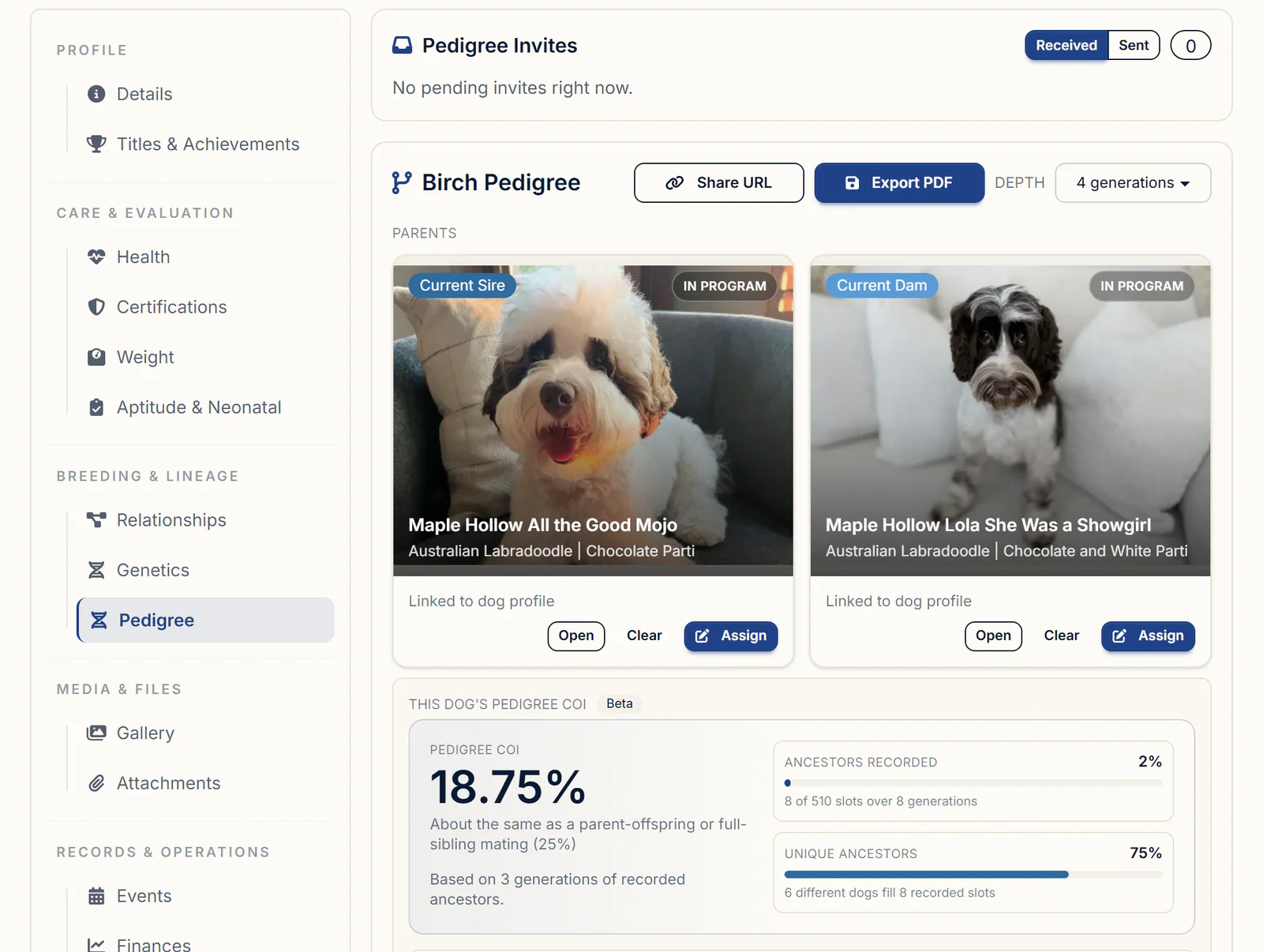
- Open Pedigree Viewer in the left menu (under Tools & Analytics), or the Pedigree tab on a dog's profile. If it asks for a pedigree profile first, click Create Profile.
- Click Assign on the Current Sire or Current Dam card. For older ancestors, click an empty Add Ancestor box in the tree. A box further back reads Add closer parent first until the dog in front of it is filled.
- Search by name or registration number. Your dogs and Outside dogs already in your pedigrees are listed together; click Select on the right one.
- Not listed? Click Add "name" as a new outside sire (or dam). Fill in Name with the registered name, plus the registration number, Color and Breed. More details (optional) holds the call name, date of birth, microchip, notes and a photo. Click Add sire or Add dam.
As you type, BreederBuddy looks for a record that's already the same dog: the same name (leading titles such as CH or GCH ignored) or the same registration number. Click Use this one, or It's a different dog if it isn't. A grandsire typed twice counts as two unrelated dogs, so the COI misses him. To fix doubles you already have, open the External pedigree catalog just under the title on the Dogs page. Merge (or Merge with...) folds one copy into the other, and every pedigree using it switches over.
Outside dogs have no Titles or Certifications tab. Keep their titles in the registered name as printed, and put OFA or CHIC numbers in Notes, which don't print on the PDF or show on a share link.
When another breeder owns the dog, open Breeder (optional) as you add it and enter their kennel and email. That invites them to co-own the dog on BreederBuddy; once they accept, you both see a Co-owned badge. Invites sent to you wait in the Pedigree Invites panel under Received: click Review Shared Dogs, then Match to Existing Dog, Create New Dog Record or Reject All. Linking shares your dog's basic details, microchip and registration numbers included, with the breeder who invited you. Stud dog management covers the rest of standing a stud for other programs.
Reading the tree and the pedigree COI
The tree shows 3 to 6 generations, and the COI card always works from up to 8.
Pick the generations in the Depth dropdown. Each box shows the dog's photo, name and registration number, marked In Program or External, and opens its details in the side panel when clicked.
The This Dog's Pedigree COI card (marked Beta) reads Not yet until both parents are assigned. Then it gives the percentage, a textbook comparison, how many generations it rests on, and how many of the 510 ancestor slots in 8 generations are filled. Unknown ancestors count as unrelated, so the figure is a floor that rises as you add generations.
In the Step 3 screenshot, one outside sire, entered once, fills three of the puppy's eight recorded slots. That's why Unique ancestors counts 6 different dogs, and why three generations already put the COI at 18.75%. For a pair you haven't bred yet, Genetics Forecast gives a projected offspring COI. How the number is worked out and how to use it is in coefficient of inbreeding in dogs.
Sharing a pedigree link and printing a certificate
A share link lets a buyer explore the live pedigree with no account, and a PDF gives you a one-page certificate to print or attach.
- Open the pedigree and click Share URL.
- Click Create Share URL, then Copy, and paste the link into an email, a post or a page on your website.
- Click Open Public View to check it. Disable Link stops sharing; Regenerate retires the old link and gives you a new one.
Viewers can switch between 3 and 6 generations and click any dog for its details and photos. Those details include registration and microchip numbers, and for your own dogs, every result on the Certifications tab, so look over what's there before you send the link. The COI stays in your account; it isn't on the link or the PDF.
For paper, click Export PDF. Choose a Layout, Classic (photos and detail lines on each ancestor) or Minimal (Names Only), and a Style: Classic Parchment, Botanical Ivory, Midnight Heirloom or Blank Page. It prints the depth you're viewing on one landscape page. Document Manager makes the same Pedigree Certificate for any of your dogs at 3, 4 or 5 generations. Either way it's printed from your records; when a buyer needs official paperwork, order a certified pedigree from the registry.
What to look for in dog pedigree software
Hold any pedigree tool against these jobs:
- One record per ancestor, with a duplicate check on name and registration number
- Parent links that carry through to every puppy from a pairing
- A tree you can take to at least five or six generations
- A COI that says what it rests on and treats missing ancestors honestly
- Titles and health clearances attached to the dogs that earned them
- A way to bring in paper pedigrees without retyping them
- A share link and a printable certificate, with a preview of what each one shows
Getting started
Pedigrees, outside dogs, the COI card, share links and PDF certificates are part of every plan, starting with Standard at $30/month or $300/year. Pro is $60/month or $600/year and adds a kennel website built from your records. Every plan has a 30-day free trial with no credit card required. Start with your main stud's sire and dam, then see the genetics and pedigree tools.
Questions
Can I upload a pedigree, like an AKC certificate, a PDF or a photo of the papers, instead of typing in every ancestor by hand?
Yes. Drop it into Buddy Intake, or use Import with Buddy on the dog's profile. Buddy reads up to four generations from the chart, matches dogs you already have, and shows the tree for review; nothing is saved until you click Approve & Import. BreederBuddy can't look a pedigree up from a registry yet. If your pedigrees live in another program or a big spreadsheet, send the export through the chat and the team migrates it for you.
How do I add a sire or dam I don't own, like another breeder's stud, to my dog's pedigree?
Add him as an outside dog. Click Assign on the parent card, or Add Ancestor in the tree, then Add "name" as a new outside sire. A name is enough if that's all you know; you don't have to own him or fill in his breeder. Outside dogs are marked External in the tree and stay out of your Dogs list.
When I add an ancestor that's already in another pedigree, why doesn't the rest of its pedigree fill in?
Usually the dog was typed in again as a new record, and the new copy has no parents. Pick the existing dog from Outside dogs already in your pedigrees, or click Use this one when BreederBuddy flags a match, and his whole recorded pedigree comes with him. To fix copies you already have, merge them in the External pedigree catalog on the Dogs page.
Can I edit, rename or delete an outside dog after I've added it to a pedigree?
Yes. On the Dogs page, click External pedigree catalog, pick the dog, change his name, breed or other details and click Save External Profile. Clicking him in the Pedigree Viewer opens the same details in the side panel, photo included. Delete tells you which pedigrees he's a parent in and takes him off them, and Merge (or Merge with...) folds two copies into the one you keep.
Can I print or export a pedigree as a PDF, and choose how many generations and whether photos show?
Yes. Click Export PDF on the pedigree. Classic shows photos and detail lines on each ancestor, Minimal (Names Only) leaves the photo boxes out, and the PDF prints the 3 to 6 generations you're viewing. The Pedigree Certificate in Document Manager does 3, 4 or 5. Both make one dog's certificate at a time, printed from your records rather than issued by a registry.
How do I share a pedigree with a puppy buyer or show it on my website?
Click Share URL on the pedigree, then Create Share URL, and paste the link into an email, a post or a page on your website. Buyers don't need an account; they can change the depth and click each dog for its details. To put a pedigree in a buyer's portal, export the PDF and add it to their contact under Attachments with the Buyer Portal column set to Visible.
Terms used in this article
- Registered name
- A dog's official name as recorded by its registry, usually starting with the breeder's kennel prefix and printed with any titles earned.
- Call name
- The everyday name a dog answers to at home, separate from the registered name on its papers.
- Generation
- One step back in a pedigree: the parents are the first generation, the grandparents the second, the great-grandparents the third.
- Linebreeding
- Breeding related dogs so that one ancestor appears more than once in a pedigree, often on both the sire's and the dam's side.
- Health clearance
- A recorded health test result for a dog, such as an OFA hip or elbow evaluation, filed under its registered name and number.
- CHIC number
- An OFA number showing a dog completed its breed's required health tests and released the results publicly. It does not mean every result was normal.
- Coefficient of inbreeding (COI)
- The probability that a dog's two copies of a gene both trace back to the same ancestor's copy, worked out from ancestors that appear on both sides of its pedigree.
Sources
- AKC: Certified Pedigreesakc.org
- OFA: CHIC Programofa.org
- OFA: Get Startedofa.org
In BreederBuddy
- Standard
- $30/month or $300/year. The full management platform: unlimited dogs, litters, and puppies, and multiple user accounts.
- Pro
- $60/month or $600/year. Everything in Standard, plus a template kennel website built from your records.
- Platforms
- Available on the web and as an Android app on Google Play (iPhone and iPad app coming soon).
- Free trial
- 30 days, full access, no credit card required.