
Email Campaigns
Email Campaigns and Go-Home Series for Dog Breeders
Send everyone on your waitlist an email at once. Set up email campaigns to keep your buyers in the loop, informed and ready for their new family member by go-home day.
Go-home series
7 emails · 4 buyers riding
Four buyers, four go-home dates, one series
Sound familiar?
Dog breeders deal with a lot of communications chaos.
- Copy pasting emails and phone numbers over and over again
- Sending out the same exact email for every single buyer on repeat
- Keeping track of each buyer's go-home date, training & need-to-know info before pickup
- Catching up puppy buyers to the latest litter updates when they've joined your waitlist late
- Replies spread across your phone, your laptop, and Facebook
- Puppy buyer messages spread across Facebook, email & text messages all at once
Campaigns
Two kinds of email
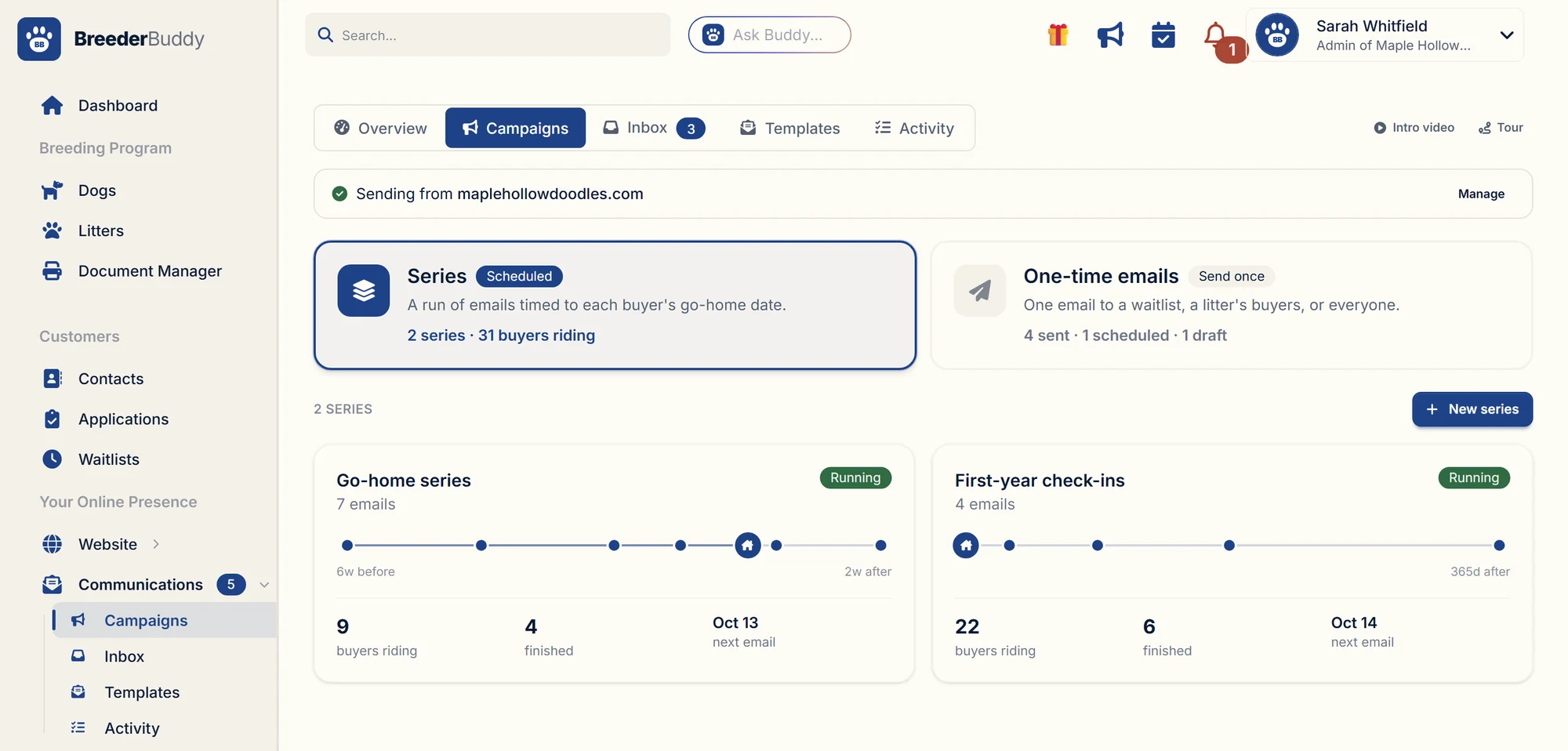
Campaigns in BreederBuddy come in two kinds. Both pick their audience from your records and send from your own domain.
Series
ScheduledA run of emails timed to each buyer’s go-home date. Every buyer rides it on their own schedule.
Good for: go-home prep, puppy-raising tips, first-year check-ins
One-time emails
Send onceOne email to a waitlist, a litter’s buyers, or everyone. Send it now or schedule it.
Good for: litter announcements, available puppies, waitlist updates, program news
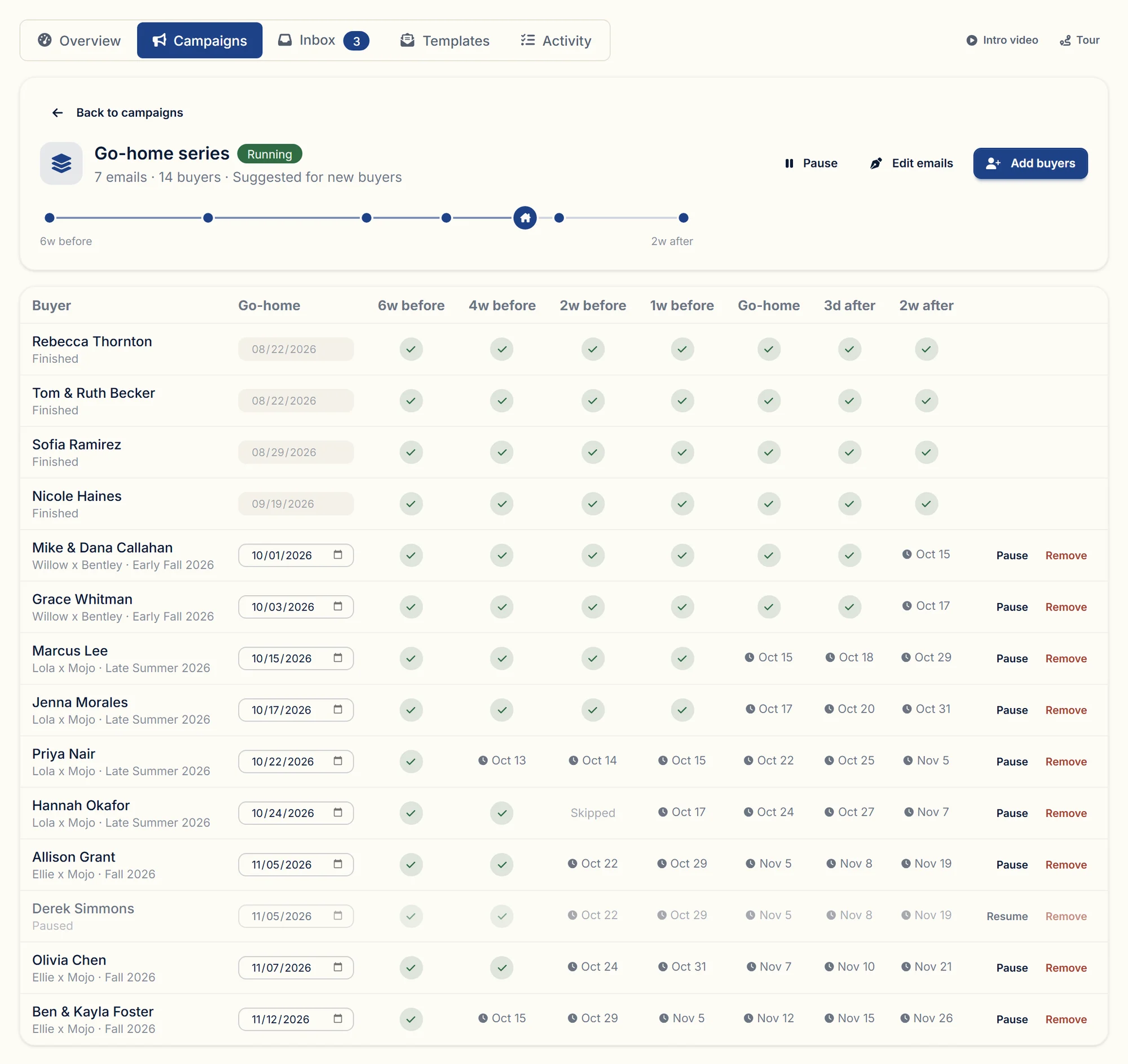
Buyers down the side, emails across the top
Every buyer gets their emails on their own go-home date
Start from the seven-email go-home series or write your own. Each email is set relative to go-home day, like six weeks before or three days after, and BreederBuddy schedules it for every buyer from their own date. Juniper leaving October 17 and Moose leaving November 12 get the same emails almost four weeks apart, and you never open a calendar.
- A starter series already written: welcome, shopping list, planning the day, one week out, go-home day, a check-in, paperwork
- Timing in plain words: 6 weeks before, on go-home day, 2 weeks after
- One grid shows every buyer and every email, sent or scheduled
- Change a buyer's go-home date and their emails move with it
Hannah Okafor
Hazel goes home Saturday, October 24
Hannah reserves Hazel on October 3
- 6 weeks before6 weeks beforeWelcome to the familySep 12
- 4 weeks before4 weeks beforeWhat to have ready at homeSep 26
- 2 weeks before2 weeks beforeLet's plan go-home dayOct 10
- 1 week before1 week beforeOne week to goOct 17
- On go-home dayOn go-home dayWelcome homeOct 24
- 3 days after3 days afterHow's it going?Oct 27
- 2 weeks after2 weeks afterPaperwork and next stepsNov 7
Hannah reserved three weeks out and still got the welcome
Add a buyer late and they still get every email
Families reserve at different times. When you add a buyer after some emails were already due, those go out a day apart instead of all at once, and then the buyer joins the regular schedule. Edit an email later and everyone who hasn't received it yet gets the new version.
- Missed emails catch up one day at a time
- Skip any email for one buyer without changing the series
- Pause a buyer, or remove them, and their remaining emails stop
- Edits apply to every email that hasn't gone out yet
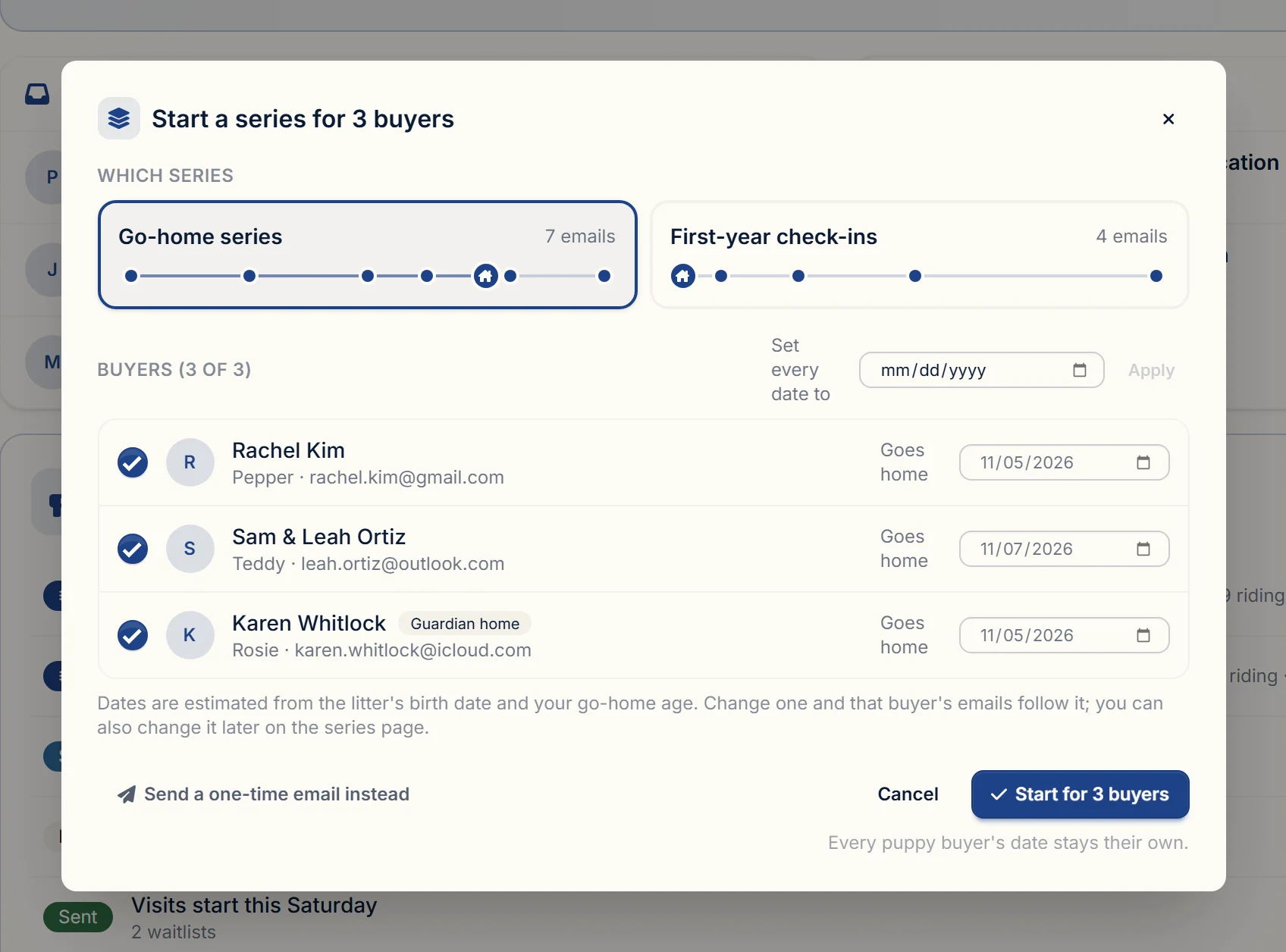
Each buyer's date, filled in from the litter
The series starts when a buyer is matched to a puppy
Set a buyer as the owner of a puppy and BreederBuddy offers to start their go-home series, with the date filled in from the litter's birth date and your usual go-home age. Set a series to start on its own if you'd rather not click. Or add a whole litter's buyers, or a waitlist, in one go.
- Suggested on the puppy's page, the litter page, and the buyer's contact page
- Per series: suggest it, start it automatically, or only when you add buyers
- Add buyers by litter, waitlist, application form, or one at a time
- Guardian homes are labeled and never added automatically
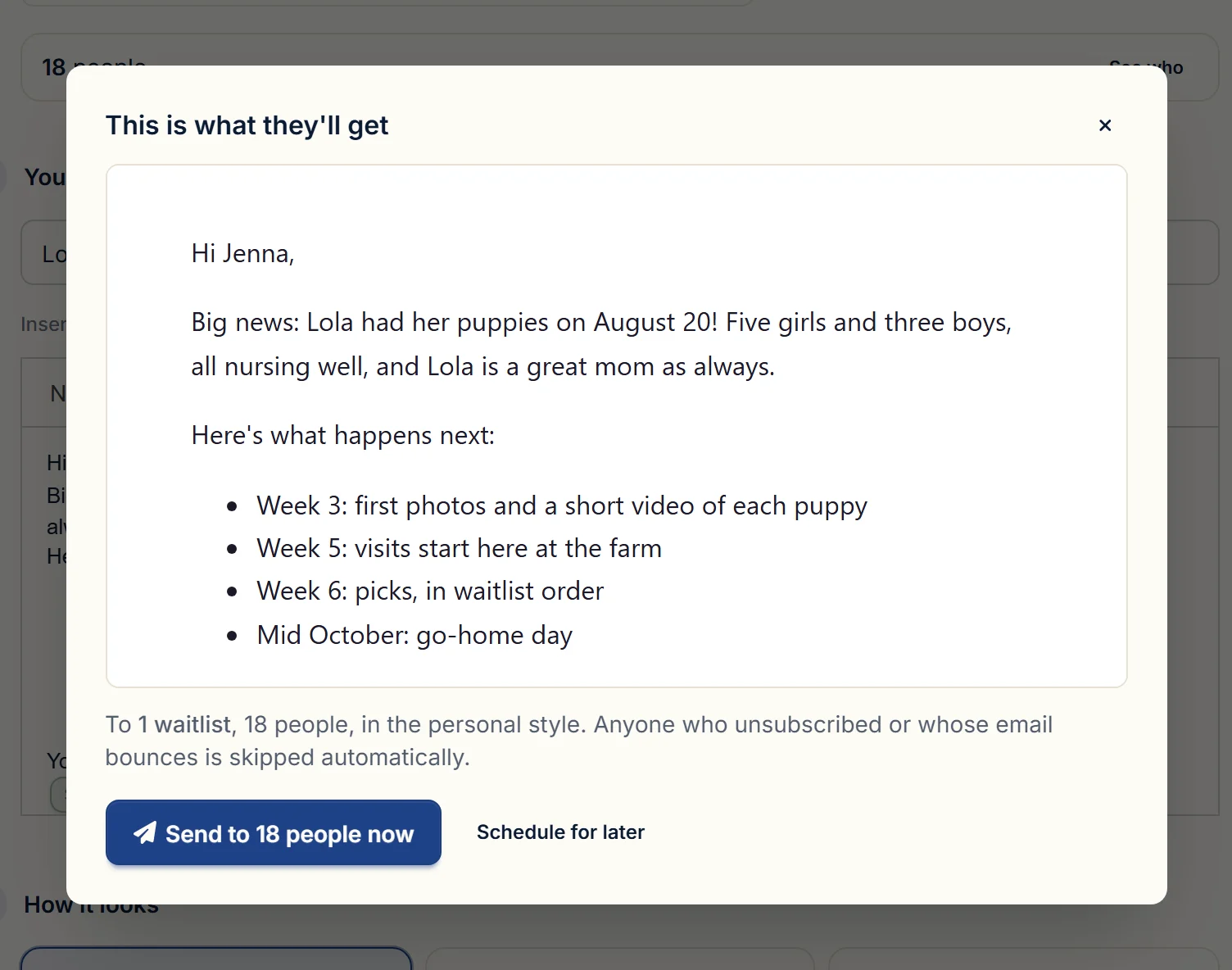
Who it goes to, how many, and exactly what they'll read
Announce a litter to the people waiting for it
Pick the litter and BreederBuddy starts the email with its details, addressed to that litter's waitlist. Starters cover a puppy becoming available, a waitlist update, a note to past puppy families, and program news. Check the real email before it goes, send yourself a test, then send now or schedule it.
- Starters for litter announcements, available puppies, waitlist updates, and past buyers
- A preview of the exact email your buyers will get
- A test send to your own inbox first
- Send now or schedule it for later
Step 1 · Audience
Who gets this email
0
people
Pick one or more groups from your records.
Two waitlists, one person added by hand, one taken off
Your lists come from your waitlists and buyers
There's no list to import or keep in sync. Pick who it's for: one or more waitlists, one or more litters' buyers, past buyers by when their puppy was born, applicants from a form, or a contact type. Someone on two of the waitlists you pick gets one email. Add anyone by hand, take anyone off, and unsubscribed contacts are skipped on their own.
- Waitlists, litter buyers, past buyers, applicants, and contact types
- A live count, plus every name, before you send
- Add or remove one person without changing the group
- Unsubscribes and spam complaints stop future emails automatically
You write it once
Subject
Let’s plan go-home day
Hi First name,
Two weeks to go. We’ll see you on Go-home date to bring Puppy name home. Reply with a time that works.
Your first name
Each buyer gets their own
From Maple Hollow Doodles <news@maplehollowdoodles.com>
To Jenna Morales
Hi Jenna,
Two weeks to go. We’ll see you on Saturday, October 17 to bring Juniper home. Reply with a time that works.
Sarah
Written once, read three different ways
Each email uses the buyer's name and their puppy's name
Write the email once with fields for the buyer's first name, the puppy's name, the go-home date, and your own name. Every buyer gets their own version. If something is blank, the email still reads naturally: "Hi there" instead of an empty space, "your puppy" instead of a missing name.
- Buyer's first or full name, kennel name, and your first name
- Puppy name and go-home date in series emails
- Sensible wording when a detail is missing
- Preview with sample names before anything sends
- MHMaple Hollow Doodles9:41 AMLola's puppies are here!Hi Jenna, Big news: Lola had her puppies on August 20! Five girls and three boys…news@maplehollowdoodles.com
- GVGreen Valley Vet8:02 AMAppointment reminderYour appointment is on Monday at 10:30…
- CChewyYesterdayYour order has shippedTrack your package…
- DKIM recordSigns every email as yours
- SPF recordLets us send for your domain
- MX recordHandles bounces on a send-only subdomain
Buyers see your kennel, not a mailing service
Sent from your own domain, in your kennel's name
Campaign emails come from your own address, like news@yourkennel.com, with your kennel name as the sender. BreederBuddy lists the DNS records to add, checks each one for you, and emails you when the domain is verified. Every email carries your mailing address and an unsubscribe link.
- Your kennel name as the sender, your domain in the address
- Step-by-step DNS setup with a live check on each record
- Unsubscribe link and one-click unsubscribe in every email
- Delivery tracked per email in Activity, replies in your Inbox
Three ways to dress an email
Hi Jenna,
Sarah
Maple Hollow Doodles
Hi Jenna,
Hi Jenna,
See the litterPersonal, Clean, or Branded
Choose how each email or series looks. Personal is the default because it reads like a note you typed yourself. Clean adds your kennel name at the top. Branded puts your logo on a card, for the emails that should feel like a newsletter.
- Pick a style per one-time email and per series
- Personal for go-home notes, Branded for litter announcements
- The preview shows the style before you send
- The same unsubscribe footer on all three
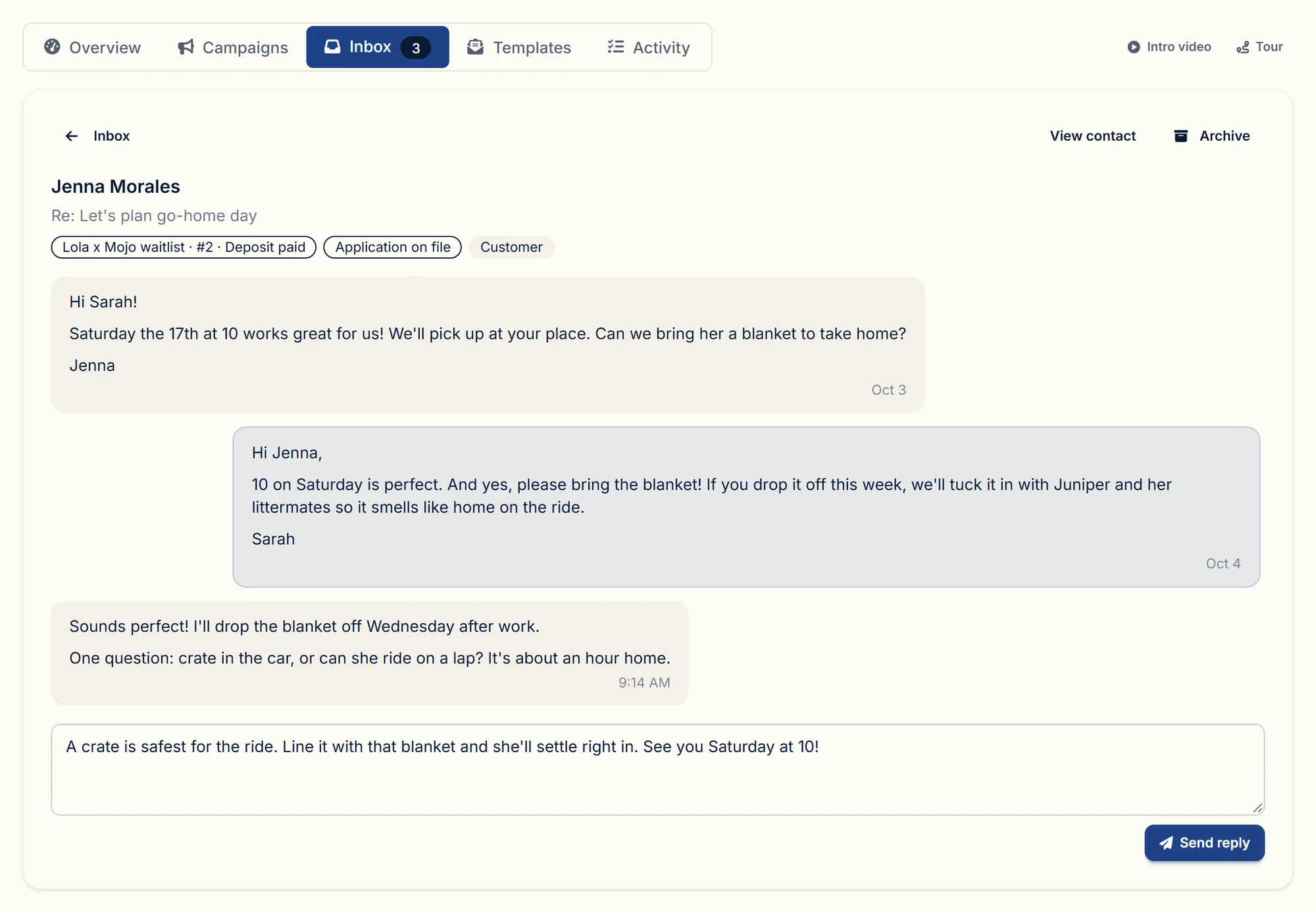
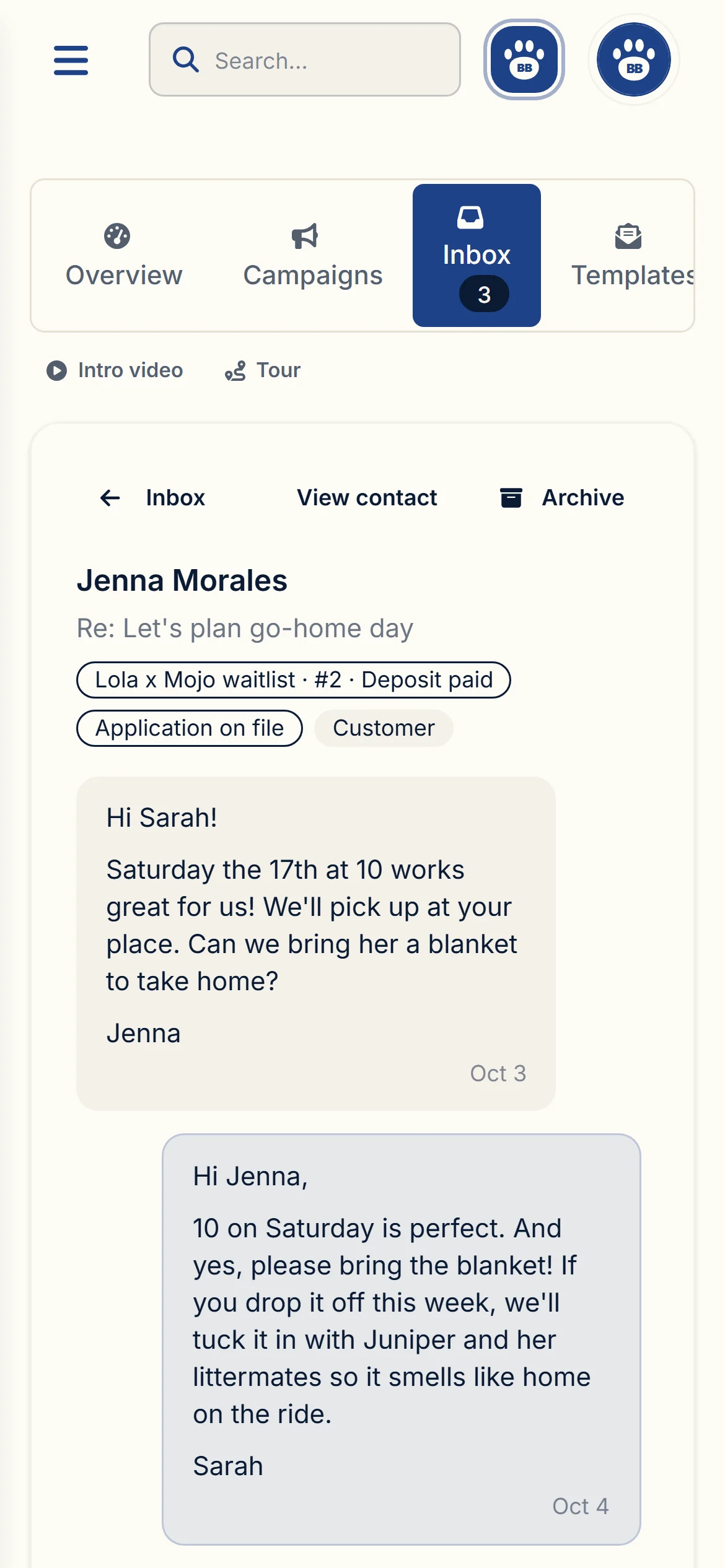
The reply, the buyer, and their waitlist spot, at your desk or on your phone
Replies land on the buyer's record
When a buyer replies to a campaign or a series email, the reply comes into your Communications inbox, threaded on that contact next to their waitlist spot and application. Answer from BreederBuddy and the whole conversation stays with their record. You also get a copy by email and a notification on your phone.
- One inbox for every conversation with your buyers
- Their waitlist spot and application beside the thread
- A notification and an email copy when someone writes back
- Archive a thread when it's handled, reopen it any time
Ready-made series
Series written for breeders
Pick one and every email opens in the editor, ready to change. Timing is counted from each buyer’s go-home day.
Go-home series
7 emails
Seven emails from welcome to two weeks home for a new puppy: what to buy, planning the day, the first-night check-in, paperwork. Each buyer gets them on their own go-home date.
- 6 weeks beforeWelcome to the family
- 4 weeks beforeWhat to have ready at home
- 2 weeks beforeLet's plan go-home day
- 1 week beforeOne week to go
- On go-home dayWelcome home
- 3 days afterHow's it going?
- 2 weeks afterPaperwork and next steps
How it works
How a go-home series works
- 1Start from the go-home seriesSeven emails, already written. Keep the wording, or make it sound like you.
- 2Match a buyer to a puppyBreederBuddy suggests the series and fills in their go-home date from the litter.
- 3Each email sends on its own dateSix weeks before, on the day, two weeks after, worked out for every buyer separately.
- 4Replies come back to youThey land in your inbox on the buyer's record, next to their waitlist spot.
Want the long version, with what to write in each one? Read the launch post.
| When | What it covers | |
|---|---|---|
| 6 weeks before | Welcome to the familyA welcome, what the next few weeks look like, and a request for the puppy's name. | A welcome, what the next few weeks look like, and a request for the puppy's name. |
| 4 weeks before | What to have ready at homeThe shopping list: the food the puppy eats now, a crate with a divider, collar, leash, ID tag, and chew toys. | The shopping list: the food the puppy eats now, a crate with a divider, collar, leash, ID tag, and chew toys. |
| 2 weeks before | Let's plan go-home dayThe go-home date, a pickup time, and where you are meeting. | The go-home date, a pickup time, and where you are meeting. |
| 1 week before | One week to goA towel for the ride, a quiet plan for the first days, and a vet visit booked for week one. | A towel for the ride, a quiet plan for the first days, and a vet visit booked for week one. |
| On go-home day | Welcome homeThe first night: keep it calm, crate close by, some crying is normal. | The first night: keep it calm, crate close by, some crying is normal. |
| 3 days after | How's it going?A check-in on the first few days, and a request for a photo. | A check-in on the first few days, and a request for a photo. |
| 2 weeks after | Paperwork and next stepsMicrochip registration in the buyer's name, and registration papers to follow. | Microchip registration in the buyer's name, and registration papers to follow. |
Every account starts with these seven. Rewrite any of them, change the timing, or build a different series from scratch.
Everything included
Everything included in campaigns and series
- Five ready-made series, including a seven-email go-home series
- Series of your own with any number of emails
- Timing relative to each buyer's go-home date
- Catch-up for buyers added late, a day apart
- Per-buyer skip, pause, remove, and date changes
- Series suggested when a buyer is matched to a puppy
- Optional automatic start per series
- One-time emails: send now or schedule
- Starters for litter announcements and waitlist updates
- Audiences from waitlists, litters, past buyers, applicants, and contact types
- A live count and full recipient list before sending
- Merge fields with natural fallbacks
- Personal, Clean, and Branded email styles
- Test sends to your own inbox
- Sending from your own verified domain
- Unsubscribe links, one-click unsubscribe, and automatic suppression
- Replies threaded on the buyer's record in your inbox
- Delivery and open tracking in Activity
Testimonials
What breeders say about BreederBuddy
Hundreds of breeders run their programs on BreederBuddy. Here is what a few of them say.

Sarae Vergason
HonorRae Shih Tzu · Erin, NY
Breeder Buddy has been the perfect addition to my dog breeding business! It is so well put together and organized and keeps all of my information in one place. The platform itself is easy to navigate, well designed, with a modern and clean feel while still offering a ton of options for keeping everything you need all in one place.

Misty Wright
208 Dox Dynasty · Nampa, Idaho
I cannot rave ENOUGH about this breeding program software! Since having switched to Breeder Buddy, it has been a game changer! He listens to breeders and takes our ideas and implements them. 1000/1000 would recommend.

Jessica Johnson
Ruff Draft Inc Dog Rescue · Chicago, IL
We used Kenny to build a custom website and he did an amazing job! In addition to the care he took to build the site he also set aside time to meet with me to make any changes or adjustments as well as to teach me the ropes.

Beverly Pausche
Fabelhaft Maine Coons · Kentville, Nova Scotia
Kenny built a site for me, even though I am a cat breeder, and the process was absolutely phenomenal. The result was just what I was hoping for when I went to him, and it integrates so well with his breeder software. If you want a great site at an affordable cost, choose Kenny to build it.

Lanny Gunter
Edge of Time Border Collies · Camden, SC
Breeder Buddy has been an absolute game changer for our breeding program! The software has allowed us to stay more organized with our program dogs but also with our communication and payments with our customers.
Heidi Emmendorfer
Sonnenfeld Shepherds · Grand Junction, CO
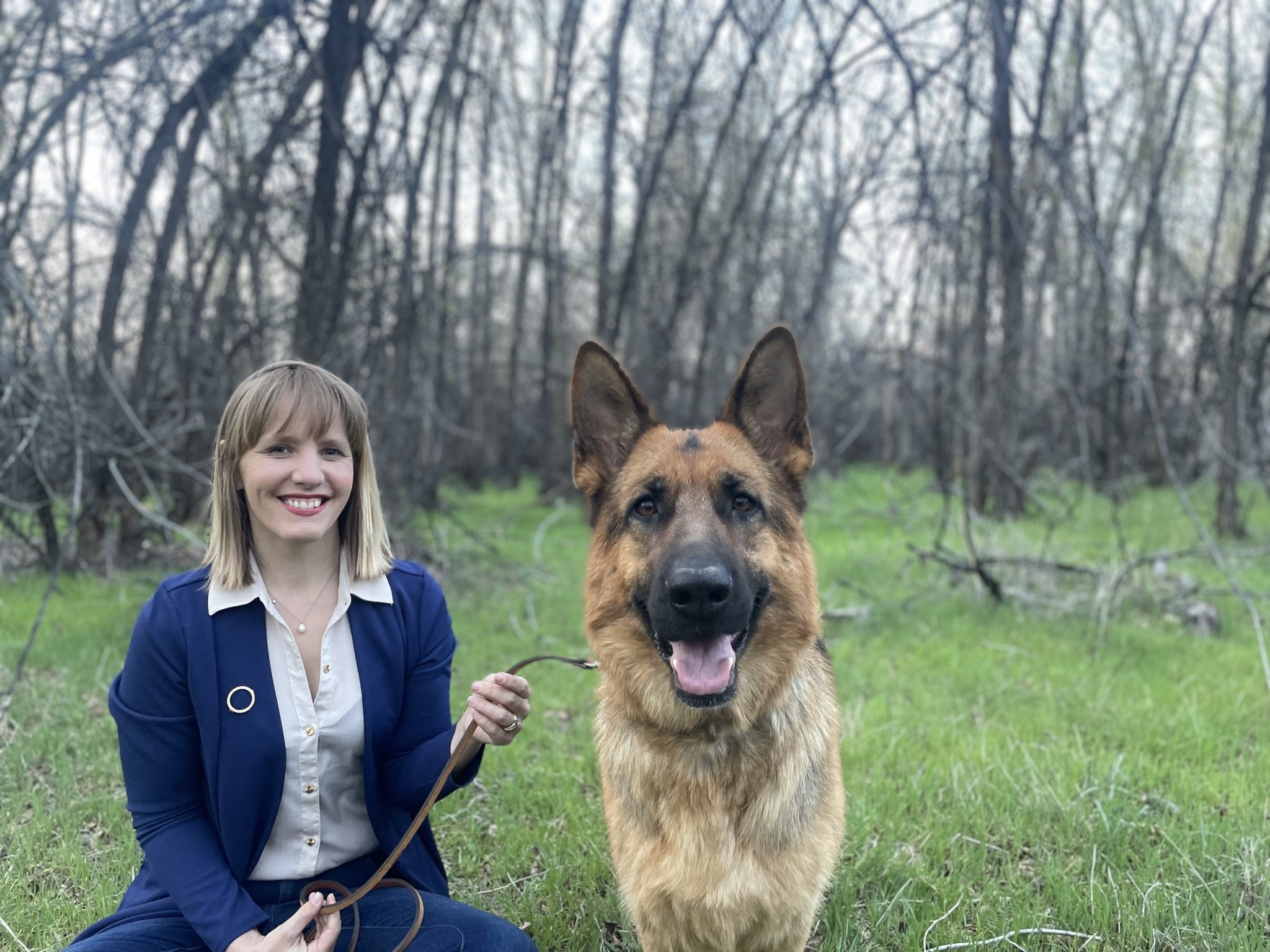
Breeder Buddy has been a fantastic addition to my breeding program. It's clean, reliable, and thoughtfully designed for how breeders actually work. It feels like it was built by people who truly understand the rhythm and demands of a responsible breeding operation.


Joined by hundreds more breeding programs across the US and Canada.
FAQs
Email campaign and go-home series questions, answered
What is a go-home email series?
A go-home series is a set of emails timed around the day a puppy goes home with its new family. In BreederBuddy every account starts with a seven-email series: a welcome six weeks out, what to have ready four weeks out, planning the pickup two weeks out, a one-week reminder, a note on go-home day, a check-in three days later, and paperwork two weeks after. You can rewrite every email, add or remove steps, and change the timing.
Which ready-made email series come with BreederBuddy?
Five, each written for breeders and timed from the buyer's go-home day: a seven-email go-home series, three progress notes for buyers waiting on their puppy, a four-lesson puppy-raising course for the first month home, first-year check-ins at one, three, and six months plus the first birthday, and check-ins for guardian homes covering settling in, health testing, and breeding plans. Pick one and every email opens in the editor, ready to change.
What emails should a breeder send before a puppy goes home?
Most programs cover the same moments: a welcome once the puppy is reserved, a shopping list a month out (food, crate, collar and tag, chew toys), a note two weeks out to set the pickup time and place, a one-week reminder with what to bring and a first vet visit to book, and a go-home day email about the first night. After pickup, a check-in a few days later and a paperwork reminder (microchip registration, registration papers) close it out. BreederBuddy's go-home series is built on exactly that order.
Can each buyer have a different go-home date?
Yes. Every email in a series is set relative to go-home day, and each buyer has their own go-home date, so two families from the same litter can be a week or a month apart. BreederBuddy fills the date in from the litter's birth date and your usual go-home age, and you can change any buyer's date. Their remaining emails move with it.
What happens if I add a buyer after some emails were already due?
Those emails still go out, a day apart instead of all at once, and then the buyer follows the regular schedule. You can also skip any email for one buyer, pause a buyer, or remove them, and their remaining emails stop.
How do buyers get added to a series?
When you set a buyer as the owner of a puppy in a litter, BreederBuddy suggests the go-home series on the puppy's page, the litter page, and the buyer's contact page. Each series can instead start automatically, or only when you add buyers yourself. You can also add a whole litter's buyers, a waitlist, or applicants from a form at once. Guardian homes are labeled as such and are never added automatically.
What is the difference between a one-time email and a series?
A one-time email goes out once to a group you pick, like a litter announcement to that litter's waitlist. A series is a run of emails that each buyer receives on their own schedule, anchored to their puppy's go-home date. Both live under Campaigns in the Communications area.
Who can I send a one-time email to?
Groups come from your own records: a litter's waitlist or every waitlist, a litter's buyers, past buyers by when their puppy was born, applicants from a specific form, a contact type, or all contacts. Choose as many waitlists or litters as you need, and someone on two of them gets one email. You can see every name before sending, and add or remove individual people.
Do I need my own domain to send campaigns?
Yes. Campaign and series emails come from your own domain, like news@yourkennel.com, with your kennel name as the sender. BreederBuddy shows you the DNS records to add, checks each one for you, and emails you when the domain is verified.
What happens when a buyer replies?
The reply lands in your Communications inbox, threaded on that contact next to their waitlist spot and application. You can answer from BreederBuddy, and you also get a copy by email and a notification so nothing sits unread.
How do unsubscribes work?
Every campaign and series email includes an unsubscribe link and your business mailing address, and supports one-click unsubscribe in Gmail and other inboxes. Anyone who unsubscribes, or marks an email as spam, is left out of future campaigns and series automatically.
Can I personalize each email?
Yes. Emails can include the buyer's first or full name, your kennel name, and your first name, and series emails can also include the puppy's name and the go-home date. If something is missing, the email still reads naturally, like 'Hi there' or 'your puppy'.
Which plan includes email campaigns and go-home series?
Campaigns and go-home series are part of the Pro plan. Your existing email templates, delivery activity, and automatic buyer emails stay on every plan. See pricing →
Does it work for kitten buyers too?
Yes. Cat programs get the same campaigns and series. The name field fills in the kitten's name, and if it is blank the email says 'your kitten'. Edit the starter emails to match how you talk about your cats.
Guides
More in Puppy buyers →- Puppy buyersHow to Automate Puppy Waitlist Emails Without Losing the Personal TouchAutomate your puppy waitlist emails with BreederBuddy's merge fields and milestone triggers — so every buyer gets a personalized, on-time update without extra work.Read guide →
- Puppy buyersWhat to Send Home With a New Puppy: The Go-Home Packet ChecklistA breeder's checklist for go-home day: the health record, the shots still due, the contract, registration paperwork, and what goes in the bag. Plus how to print the whole packet from your records in BreederBuddy.Read guide →
- Puppy buyersBreeder Invoice Template: What Goes on a Puppy InvoiceA breeder invoice template, line by line: deposit, puppy price, deposit credit, extras, due date and payment methods, plus how to send and track it.Read guide →
- Puppy buyersSpay Neuter Contract: Limited Registration, Deadlines and ProofWhat a spay neuter contract covers: limited registration, the alter deadline, proof, breach terms and breeding rights, and how to send one for e-signature.Read guide →
Ready to simplify your breeding program?
Join our growing community of breeders using one system to manage dogs, buyers, and daily operations in one place.