
Whelping Records: What to Log at Birth and Through Day 16
By Kenny SchultzUpdated Last reviewed
Whelping records should capture, for each puppy, birth time and order, sex, color, collar color, birth weight, presentation and whether its placenta passed, plus the dam's progress and any vet calls. After birth, log weights at least daily, more often in week one, and keep an ENS and ESI log from day 3 to day 16.
Key takeaways
- Write down the time each puppy is born and the gap since the last one, so you can give your vet real numbers during a hard whelp.
- Count placentas against puppies and tell your vet if any are missing.
- Put a collar on each puppy once it's dry and record the color next to its birth order, sex and markings.
- Weigh every puppy at birth and at least once a day afterward, more often in week one, and act on any puppy that loses ground.
- Agree on your vet's call-me thresholds before the due date and tape them to the whelping box.
Whelping records are the notes you keep while a litter is born and through the first couple of weeks: when each puppy arrived, in what order, which collar it wears, what it weighed, and how the dam is doing. At 2 a.m., with a puppy in your hand and the dam pushing again, nobody wants to write anything down. That's exactly when it matters most.
A good whelping record sheet answers your vet's questions on the phone, shows you which puppy is slipping before it's obvious, and becomes the litter's history for registration and the dam's next breeding. This article walks through the record field by field, in the order you fill it in, then shows where each line lives in BreederBuddy.
Why whelping records matter
Whelping records turn a blur of a night into facts you and your vet can act on.
Three reasons come up again and again:
- Vet calls during a hard whelp. The first questions are how long since the last puppy, how many so far, and whether every placenta has passed. If you wrote it down, you can answer in ten seconds.
- Catching a puppy that's falling behind. A puppy that's 20 grams down on day 2 looks fine in the box. On paper it stands out.
- The litter's history. Birth date, count, sex split and colors feed your registration paperwork, and the dam's whelping notes tell you what to expect next time.
Before labor starts
The record starts before the first puppy, with the due date and the dam's temperature.
Work out the due date from the breeding date or, better, from ovulation timing if you did progesterone testing. Start taking the dam's rectal temperature twice a day about a week out. A drop below roughly 99°F is the classic sign that labor is coming, usually within a day. More on that in whelping watch and the pre-labor temperature drop.
Get the boring things ready while you're calm:
- A printed sheet or clipboard at the box, a pen, a clock you can read in low light
- A gram scale, zeroed
- Collars in enough colors for the biggest litter you'd expect
- Your vet's and the emergency clinic's numbers, and the vet's thresholds for when to call
What to log for each puppy at birth
Each puppy gets one line on the sheet, filled in as it arrives.
| What to record | Why it matters |
|---|---|
| Birth time and order (Pup 1, 2, 3) | Shows the gap between puppies for your vet |
| Sex, color, markings | Identifies the puppy and feeds registration |
| Collar color | Tells littermates apart from day one |
| Birth weight in grams | Baseline for every weight after it |
| Presentation (head first, breech) and any help given | Explains a slow start or a weak puppy |
| Placenta passed (yes or no) | A missing placenta is worth a vet call |
| Notes: cleft palate check, color, vigor, nursing | Flags anything to watch |
Put each puppy's collar on once it's dry and has had a first nurse, and write the color next to its birth order right away. Soft whelping ID collars or rickrack both work. Check the fit every day, because puppies grow fast and a collar that fit on day 1 can be tight by day 4.
Count placentas as you go. Dams often eat some of them, so you may need to watch closely. If the count comes up short at the end, tell your vet.
Recording the dam during whelping
The dam's side of the record is mostly times: when hard labor started, when each puppy came, and how long she rested in between.
Puppies often arrive 30 minutes to an hour or two apart, and some dams take a longer rest midway. Many vets want a call if she's straining hard for 30 minutes or more with no puppy, if more than about two hours pass between puppies when you know more are coming, or if you see green or bloody discharge before the first puppy. These are general guides. Ask your own vet for their numbers before the due date and write them on the sheet.
Also note:
- Contractions, how strong, and rest periods
- Each call to the vet, the time, and what they told you
- Any medication given, such as calcium or oxytocin, with the time and dose. Only give these on your vet's instructions.
After whelping, keep a short daily line on the dam for the first week or two: temperature, appetite, discharge, milk and mammary glands, stool and how she's mothering. That record is what you'll reread before her next litter.
The first 48 hours and the daily log
The first two days are about nursing and weight, and the next two weeks are a daily check-in per puppy.
In the first 48 hours, check that every puppy is nursing, and weigh each one at least twice a day. A small loss in the first day isn't unusual, but puppies should be back to birth weight within a couple of days. A common rule of thumb is steady gain of around 5 to 10% of body weight a day after that, and roughly double the birth weight by about day 10. Your vet can tell you what's normal for your breed. Plan the vet check and, if your breed calls for it, dewclaw removal in this window.
Flag a weak puppy on the sheet the moment you see it: not latching, crying constantly, cold to the touch, or losing weight two weigh-ins in a row. Then call your vet.
From day 3 to day 16, many breeders add ENS and ESI. ENS is five short exercises, once a day: tactile stimulation between the toes, holding the puppy head up, head down and on its back, and a few seconds on a cool damp towel. ESI is one new scent a day. Your ENS log for puppies only needs the day, the exercises done, how each puppy reacted, and who handled them. For weight targets and what to do when a puppy stalls, see puppy weight tracking.
Running whelping records in BreederBuddy
In BreederBuddy the litter is the record: you set it up before labor, add puppies in birth order with their collar colors, and log weights and ENS on each puppy.
Set up the litter before labor
- Go to Litters in the left menu and click Add Litter.
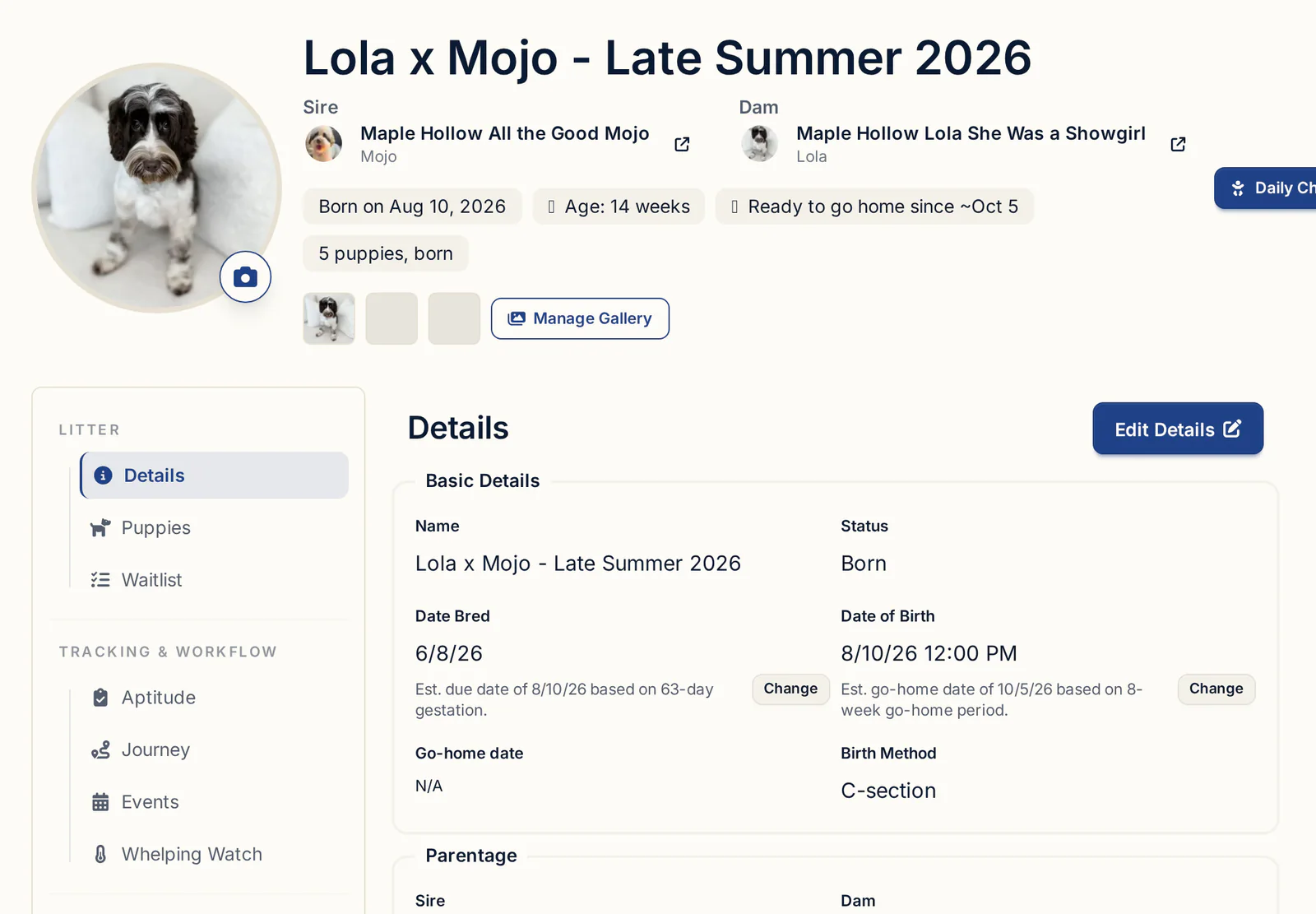
- Enter a Name, set Status to Planned, and enter the Date Bred. The estimated due date shows under it, based on a 61-day gestation unless you change it with Change.
- Pick the Sire and Dam under Parentage, then click Save.
- If the dam is one of your dogs, the litter's Whelping Watch tab holds her temperature log as the due date gets close.
Add puppies in birth order with collar colors
When puppies start arriving, you can add them one at a time or all at once.
- Open the litter's Puppies tab. Adding the first puppy prompts you to mark the litter Born. You can also open Details, click Edit Details, set Status to Born and fill in the Date of Birth.
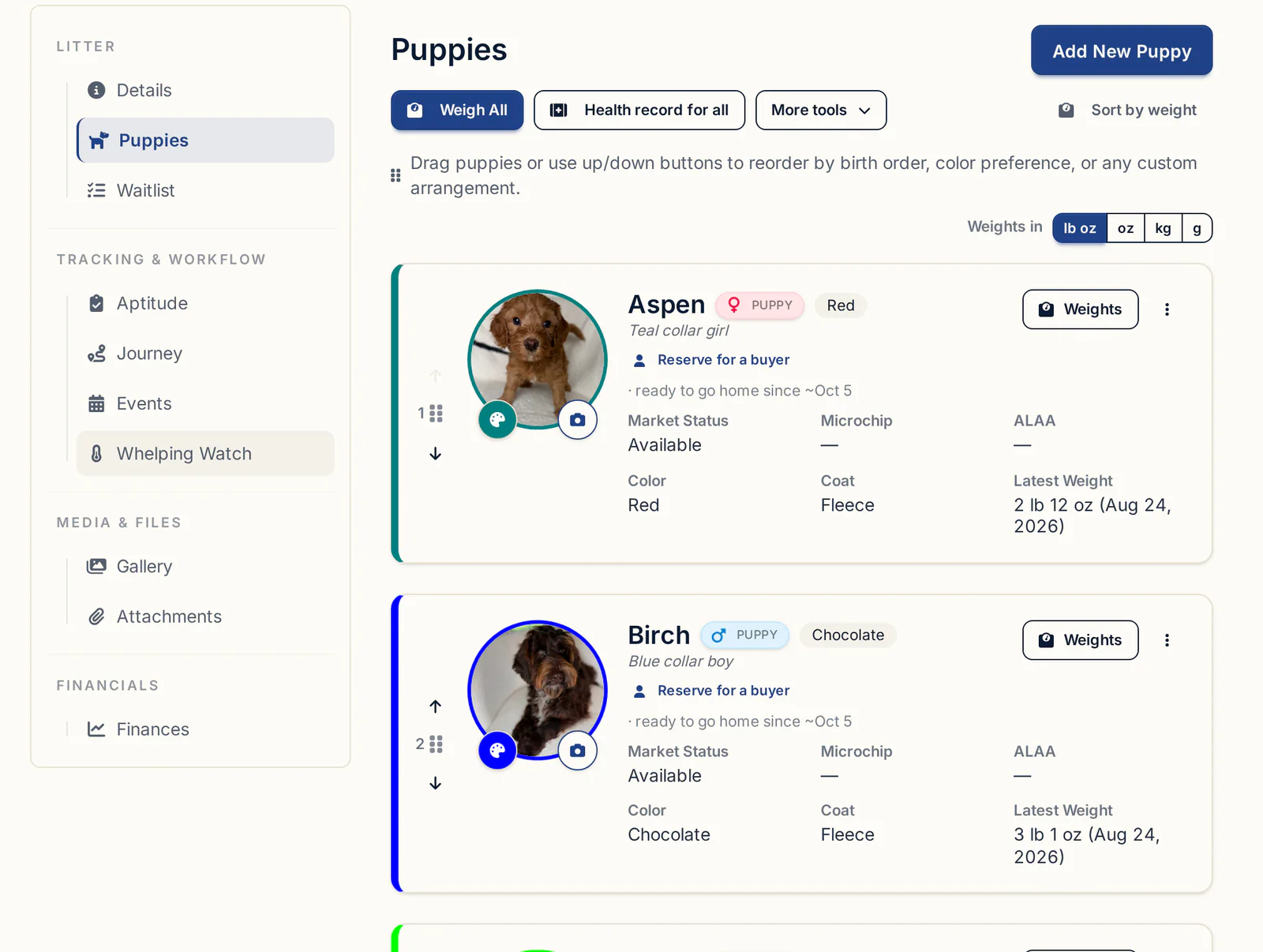
- Click Add New Puppy for each one as it's born. Name and Sex are required. Add the Collar Color and a Quick-add first weight for the birth weight.
- Or, once the dust settles, use Bulk Add Puppies in the Toolbox: enter how many Males and Females and an optional Name prefix. Puppies come in named like "Male Puppy 1", and you rename them later with Quick-edit details.
- Set the collar color by clicking the small colored dot on each puppy's photo (hover text: Set collar color).
- Drag each card by its handle, or use the up and down arrows, to put the puppies in birth order. BreederBuddy saves it, and the same order is used in the Neonatal Check-In puppy picker and for the puppy rows on the AKC Litter Record.
There's no dedicated field for birth time, presentation or placentas. Keep those on your paper sheet at the box and copy them into each puppy's first check-in Notes, or photograph the sheet and upload it to the litter's Attachments tab. The litter's Details also has a birth method you can fill in with Edit Details. Medications and vet visits for the dam go on her own Health tab.
Log daily neonatal check-ins
The Neonatal Check-In is a daily log per puppy: weight any day once the litter is Born, and ENS and ESI on days 3 through 16.
- On your Dashboard, find the Neonatal Check-In card. If it isn't there, click the sliders icon near the top (hover text: Manage dashboard sections), tick Neonatal Check-In, and click Save changes.
- Click Check In next to the litter, or Full View to open it on its own page. The top shows the litter's day, with arrows to move between days.
- Pick a puppy in the carousel. It shows the photo, collar color and position, like "1 of 8".
- Enter the weight in pounds and ounces. A small chart shows the change since the last weight in grams. Saving a second weight on the same day replaces that day's weight.
- From day 3, pick the ENS stimulus (Tactile, Supine, Cranial, Caudal or Thermal Stimulation) and reaction (None to Strong Protest), and the ESI scent and reaction (Positive, Neutral or Negative).
- Add Notes and who did it under Handled By, then click Save Check-In. A green checkmark marks what's logged. Each section has a Skip checkbox for days you can't get to it, and the Previous day arrow lets you fill in a missed day.
The check-in doesn't record puppy temperatures. If you take them, put them in Notes.
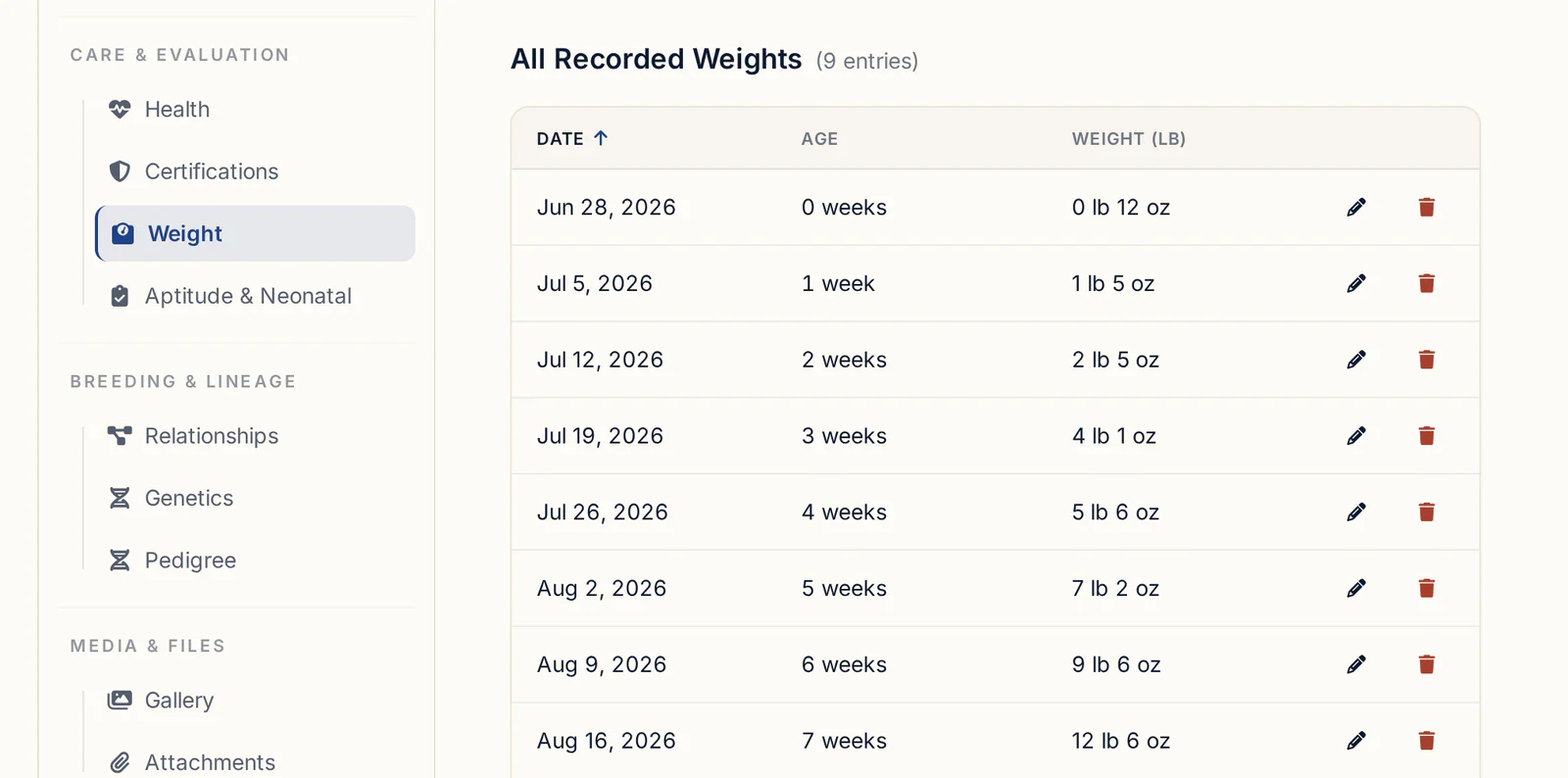
For twice-a-day weigh-ins in week one, Weigh All in the Toolbox is quicker: set the Weigh-in date and Unit first, type each weight, and press Enter to jump to the next puppy. An arrow beside each puppy shows the change since its last weight, with a down arrow for a loss. Sort by Weight lines the litter up heaviest first without changing your saved birth order.
Each puppy's full history sits on its Weight tab (or View/Add Weight on its card), and its ENS and ESI sessions on its Aptitude & Neonatal tab.
More on the day-to-day side in litter care and daily workflows.
Turning the whelp into a care schedule
Once the litter is born, a care schedule turns your birth-to-go-home protocol into dated reminders.
- Open the litter's Events tab and click Apply Schedule to this Litter.
- Pick a schedule from Care Schedules, such as your own puppy protocol or a starter template you've reviewed with your vet.
- Set the Start Date. That's Day 0, usually the whelping date. Every event uses the time of day from the start date, so set something like 8:00 AM.
- Confirm. Each task becomes an event on the litter and on your calendar, dated by its Days from start: a dewclaw check on day 3, eyes-open check and first deworming on day 14, and so on.
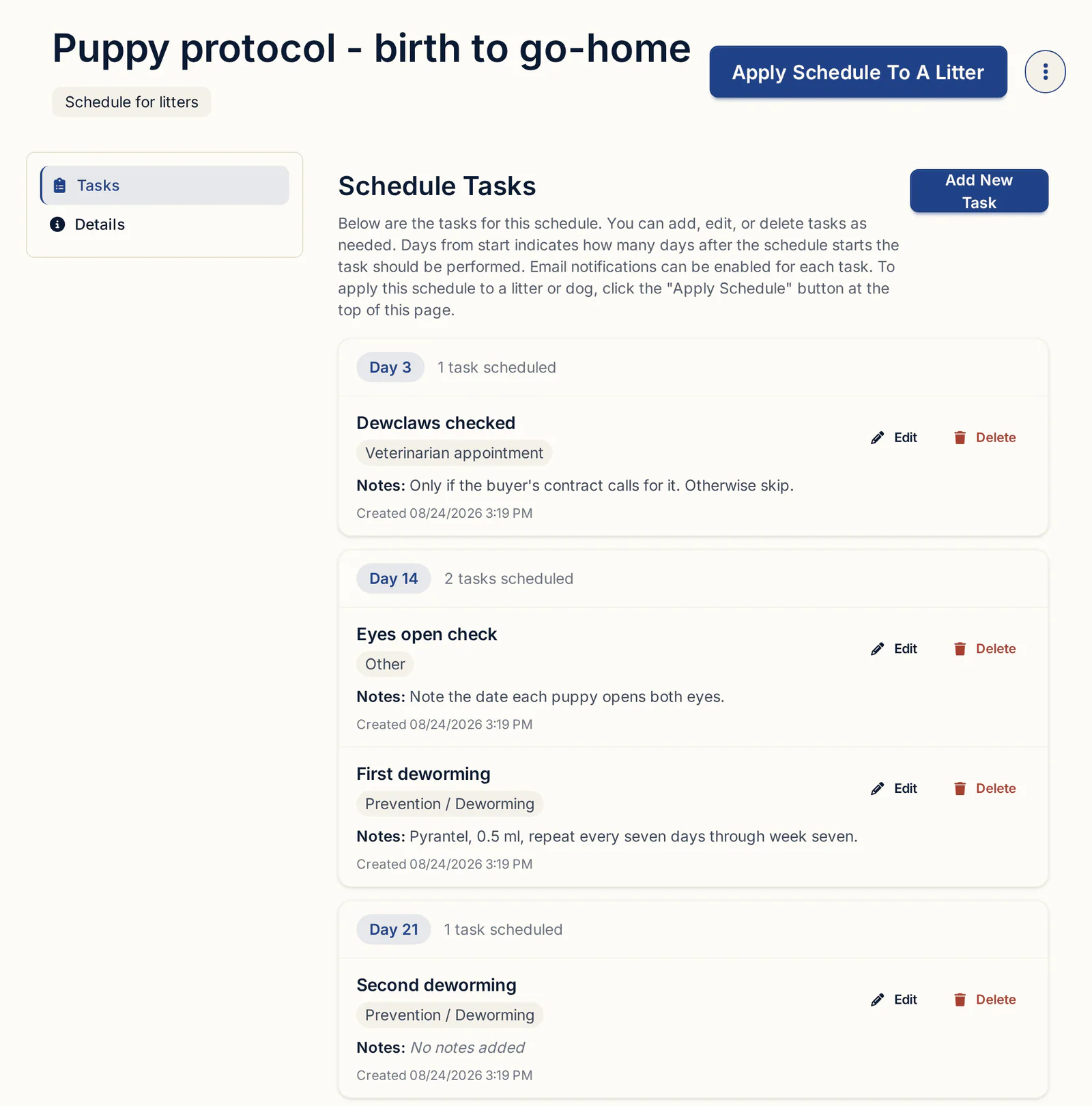
Tasks with Email Notification? ticked send an email reminder. For the dosing weeks themselves, see the puppy deworming and vaccination schedule.
Keeping the records after go-home
The whelping record doesn't get thrown out at eight weeks: part of it goes home with each puppy, and the rest stays with the dam.
Each check-in is saved to the puppy's record and stays with that dog for life. When it's time to hand records over:
- Print for owner on a puppy's card makes a go-home packet. Tick the sections you want, including Weight History, and click Generate PDF.
- Export Weight Report under the litter's weight chart gives you the whole litter's weights as a PDF, handy for your vet.
- Litter summary PDF in the litter's three-dot menu puts the litter, both parents and every puppy's health records in one file.
What goes in the buyer's folder is covered in the go-home packet checklist. When the litter is done, archive it from the three-dot menu rather than deleting it, so the history is there when you plan the dam's next breeding. For how long to keep records, check your registry's recordkeeping rules. Many breeders keep them for the life of the dam and the puppies.
What to look for in whelping record software
Hold any tool, or your own spreadsheet, against this list:
- Puppies kept in birth order, with that order carried into registration forms
- Collar colors visible wherever you pick a puppy
- Fast weigh-ins for the whole litter, with the change since last time
- A daily ENS and ESI log per puppy, with a way to fill in missed days
- A place for the dam's medications and vet visits
- Care reminders dated from the whelping date
- PDFs you can hand to a vet or a buyer
- Records that stay with each dog after the litter is archived
Getting started
Litters, the Neonatal Check-In, care schedules and the go-home PDFs are on every plan, starting with Standard at $30/month or $300/year. Pro, at $60/month or $600/year, adds a kennel website built from the same records. Every plan starts with a 30-day free trial, no credit card required.
Questions
What should I write down when my dog is whelping?
For each puppy: birth time and order, sex, color and markings, collar color, birth weight, presentation, any help you gave, and whether its placenta passed. For the dam: when hard labor started, rest periods, every vet call and what was said, and any medication given on your vet's advice.
How do you keep track of which puppy is which at birth?
Put a colored whelping ID collar on each puppy once it's dry and has nursed, and write the color next to its birth order, sex and markings. In BreederBuddy, set the collar color with the dot on each puppy's photo and drag the cards into birth order.
How often should I weigh newborn puppies?
Weigh at birth, then at least twice a day for the first week and once a day after that. Weigh in grams so small losses show up. Any puppy that loses weight two weigh-ins in a row, or stops gaining, is worth a call to your vet.
How long between puppies is too long?
Puppies often come 30 minutes to an hour or two apart. Many vets want a call if the dam strains hard for 30 minutes or more without a puppy, or if more than about two hours pass with puppies still to come. Ask your vet for their own thresholds before the due date.
Do I need to record placentas?
Yes. Tick off a placenta for each puppy as it passes. If you count fewer placentas than puppies at the end, tell your vet, since a retained placenta can cause problems for the dam.
Can I print a whelping record for the vet or the buyer?
Yes. In BreederBuddy, Export Weight Report gives the whole litter's weights as a PDF, Litter summary PDF puts the litter, parents and every puppy's health records in one file, and Print for owner makes a go-home packet for one puppy.
Terms used in this article
- Whelping
- The birth of a litter of puppies, from the start of labor until the last puppy and placenta have been delivered.
- Birth order
- The sequence in which puppies are born, usually numbered 1, 2, 3, and recorded with each puppy's birth time.
- Whelping ID collar
- A soft, adjustable colored band put on a newborn puppy so you can tell littermates apart until their markings or size do it for you.
- Retained placenta
- A placenta that stays in the uterus after its puppy is born, which can cause infection and is worth a call to your vet.
- ENS (Early Neurological Stimulation)
- A set of five short handling exercises done once a day on newborn puppies, usually from day 3 to day 16.
- ESI (Early Scent Introduction)
- Letting newborn puppies sniff a different scent each day during the same early window as ENS, and noting how they react.
- Neonatal period
- Roughly the first two weeks of a puppy's life, before the eyes and ears open, when weight gain is the main health signal.
In BreederBuddy
- Standard
- $30/month or $300/year. The full management platform: unlimited dogs, litters, and puppies, and multiple user accounts.
- Pro
- $60/month or $600/year. Everything in Standard, plus a template kennel website built from your records.
- Platforms
- Available on the web and as an Android app on Google Play (iPhone and iPad app coming soon).
- Free trial
- 30 days, no credit card, full Pro features. At the end, keep Pro ($60/month) or continue on Standard ($30/month).