
Dog Breeding Calendar: Heats, Due Dates and Puppy Care in One Place
By Kenny SchultzUpdated Last reviewed
A dog breeding calendar puts every female's heats, fertile windows, breedings, estimated due dates, go-home days and puppy care tasks on one schedule. In BreederBuddy, heats, fertile windows, due dates, go-home days and birthdays fill in from your records, care schedules add timed litter tasks, and you add vet visits and reminders yourself.
Key takeaways
- Log every past heat with its real start date. Next-heat projections use her typical gap, and with only one cycle on file the estimate assumes about 180 days.
- Count due dates from ovulation when you know it (about 63 days). A breeding date alone is a rougher guide.
- Build your puppy protocol once as a care schedule, then apply it the day the litter is born with the whelping date as Day 0.
- Add each deworming and vaccine as its own task so each dose gets its own date and reminder.
- Filter the calendar down to Est. Whelpings when you only want to see who is due next.
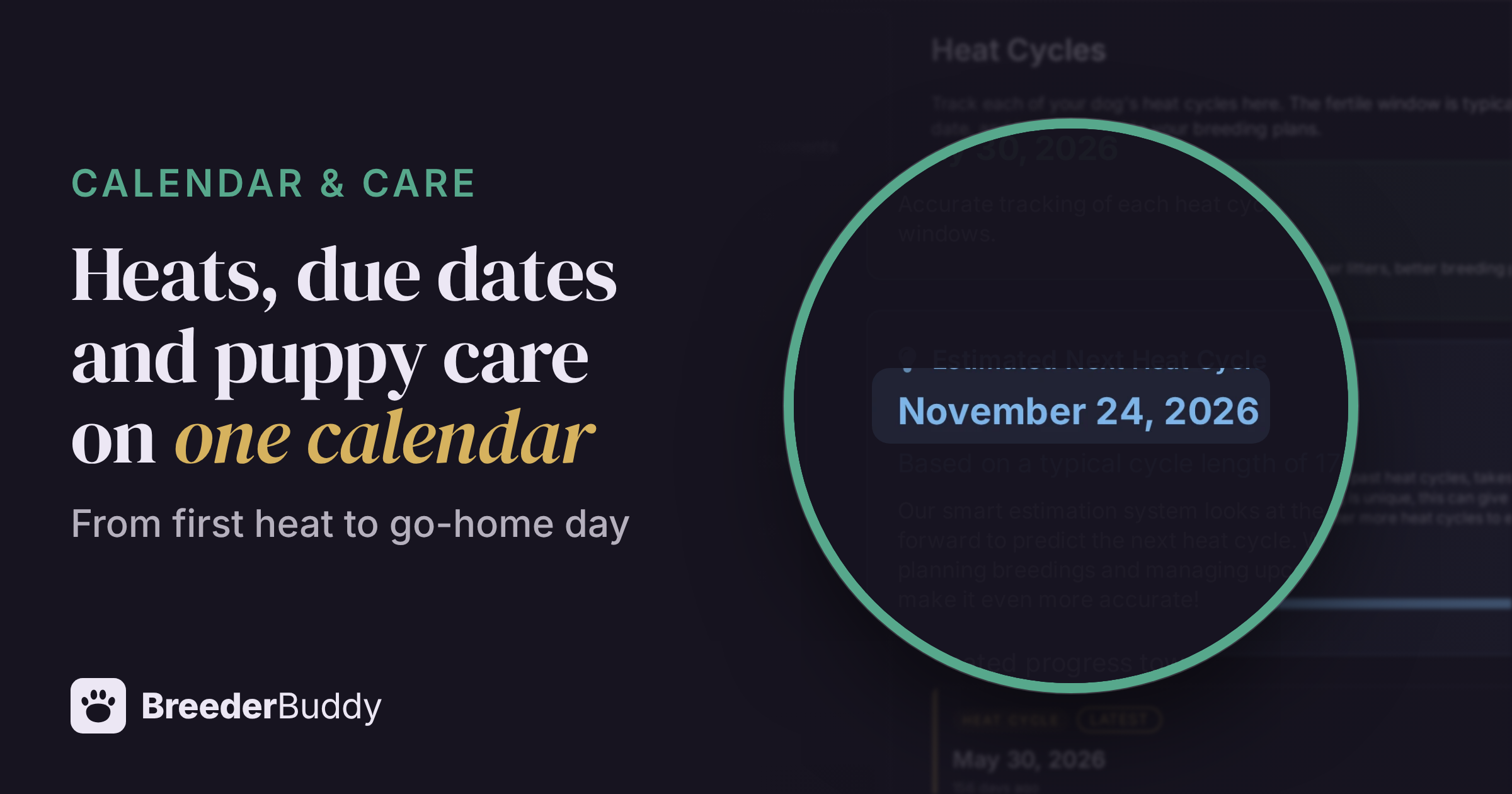
A dog breeding calendar has more moving parts than any normal calendar. Heats you can only estimate, fertile windows that shift with progesterone, breeding dates, a due date, whelping, then eight weeks of dewormings, vet checks and weaning before go-home day. Spread that across three or four females and a wall calendar, a phone app and a notebook start to disagree.
The fix is one schedule where the breeding dates come from the records themselves, so changing a heat or a litter moves the calendar with it. This article walks through a breeding year as it lands on the calendar, from the first sign of heat to go-home day, and shows which events BreederBuddy fills in on its own and which ones you add.
What belongs on a dog breeding calendar
A good breeding calendar holds everything with a date in your program, and most of those dates come from other records rather than being typed in by hand.
For each female, that means past and projected heats, her fertile window, every breeding, the pregnancy check, the due date and whelping watch. For each litter, it means the care tasks from birth to go-home and the go-home day itself. Around those sit the ordinary kennel calendar items: vet appointments, vaccine boosters for adults, monthly prevention, and birthdays.
The practical split is between dates that should follow a record and dates you set yourself:
| Event | Where it comes from | Can you drag it? |
|---|---|---|
| Heat cycles and fertile windows | Her Heat Cycles tab | No, edit the cycle |
| Estimated heats and fertile windows | Projected from her own history | No |
| Estimated whelping ("Est. Birth") | The litter's Date Bred | No, edit the litter |
| Go-home day | The litter's or puppy's go-home date, or an estimate from birth | No |
| Birthdays | Each dog's date of birth | No |
| Care tasks | A care schedule you apply to a litter or dog | Yes |
| Vet visits, follow-ups, other events | You add them | Yes |
In BreederBuddy, all of these sit on the Calendar, under Events in the left menu. More on fitting it into your week in daily kennel workflows.
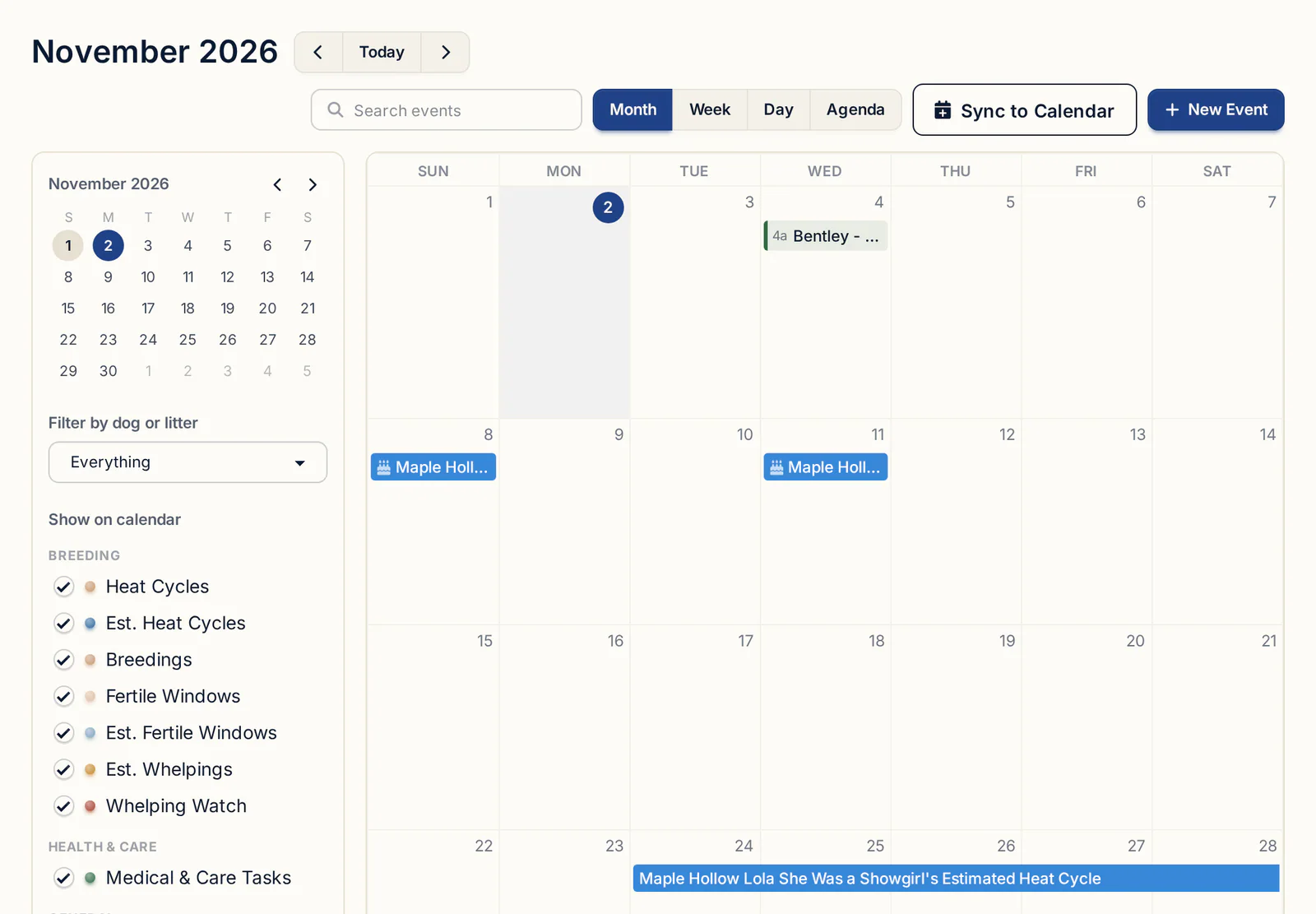
Projected heats and fertile windows
The calendar can only project her next heat if you log the heats she has already had.
You probably know your girls roughly: this one cycles every six months, that one closer to eight. A projection makes that knowledge visible a year out, so you can line up a stud, a progesterone budget and your own time off. It is still an estimate. Watch for the real signs and log the real start date when she comes in.
To record a heat:
- Open the female from Dogs and click the Heat Cycles tab (in the Care & Evaluation group).
- Click Add Heat Cycle (or Add First Heat Cycle).
- Enter the Start Date, the day the heat began.
- Leave the Fertile Window Start Offset (days) and Fertile Window End Offset (days) at their defaults of 9 and 14, or adjust them for her.
- Click Save.
The tab then shows her Last Recorded Heat Cycle and an Estimated Next Heat Cycle. If the tab is missing, her Type is probably still set to Puppy.
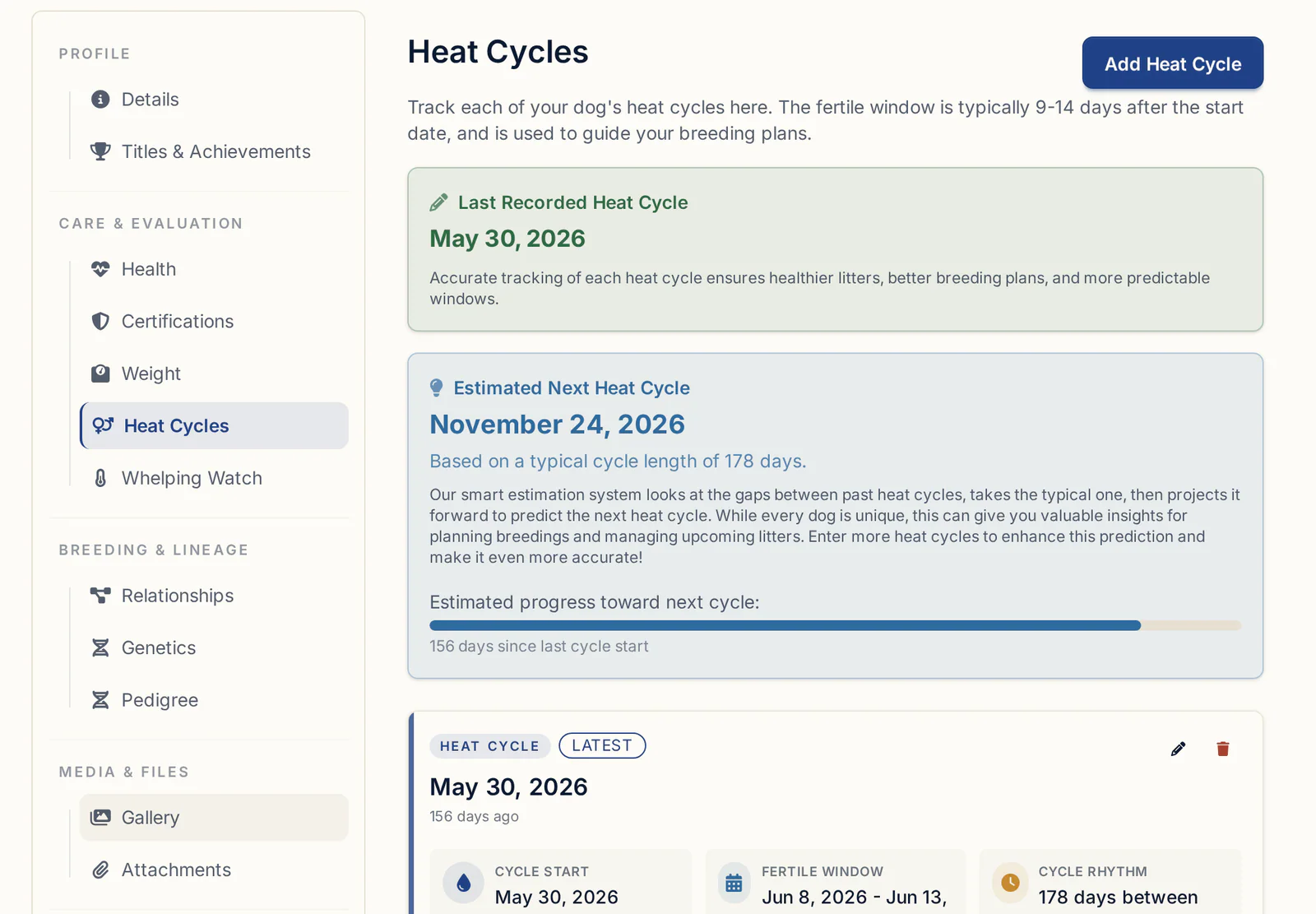
How accurate is the projection? It depends on how many heats you've logged. BreederBuddy looks at the gaps between her past heats and uses the middle one, so a single odd gap or a mistyped date doesn't throw it off. With only one cycle on file, it assumes about 180 days. Add her older heats with their real start dates and the estimate tightens up. If her cycles are genuinely irregular, the projection will move around, and that's honest. Treat it as a heads-up to start watching, not a date to book a stud.
Once she's in heat, progesterone testing takes over from the estimate. On the heat cycle, expand the Cycle Activity section for progesterone and breedings, and click Log Progesterone Test. When a result crosses 5 ng/mL, the Ovulation Timing panel suggests breeding windows (natural or fresh AI at ovulation plus 2 to 3 days, frozen or surgical AI at plus 3 to 4), and Apply to fertile window moves her fertile window on the calendar to match. If a reading comes back below the ovulation threshold, BreederBuddy offers to put a retest reminder on the calendar. More on reading the numbers in progesterone timing for dogs, and on what to record each cycle in dog heat cycle tracking.
Planning litters across all your females
The Litter Planner shows every active breeding female on one timeline, so you can see a whole year of heats and pregnancies at once.
Find it under Tools & Analytics. Each girl gets a row. Blue bars are heat cycles, recorded or projected, and pink bars are pregnancies. Projected heats look slightly faded so you can tell them from real ones.
- All Females, In Heat and Pregnant filter the rows, each with a count.
- Zoom Level switches between 12 mo, 6 mo and 3 mo.
- Forecast shows 3 cycles or 4 cycles of projected heats, or Off.
- Export PDF saves the plan as it's filtered, handy for a stud owner or a co-owner.
This is where you catch two girls likely to come in the same month, or a stud who's booked when your best female is due. Only dogs with Sex set to Female, Type set to Active Breeding Dog, and fertility not set to Spayed / Neutered appear. When a girl retires, change her Type to Retired and her projections stop. Her history stays.
From breeding date to due date
The due date comes from a litter, not from the breeding record, so create the litter as soon as she's bred.
A quick word on the math. Gestation in dogs is about 63 days from ovulation. Counted from a breeding date it varies more, because a female can be bred before or after she ovulates. That's why breeders who progesterone-test count from ovulation, and why a due date from a single tie date is a range, not a promise. Your vet's confirmation ultrasound (often around four weeks) and pre-whelp x-ray narrow it down.
To get it on the calendar:
- On the heat cycle, click Log Breeding, enter the Breeding Date, pick the Breeding Method (Natural tie, TCI, AI - Fresh/Chilled, AI - Frozen or AI - Surgical) and choose the sire.
- When BreederBuddy asks What's next for this breeding?, click Create the litter. The litter opens with the parents and Date Bred filled in.
- Optionally click Create pregnancy check reminder. It lands 28 days after breeding by default, and you can change the number first.
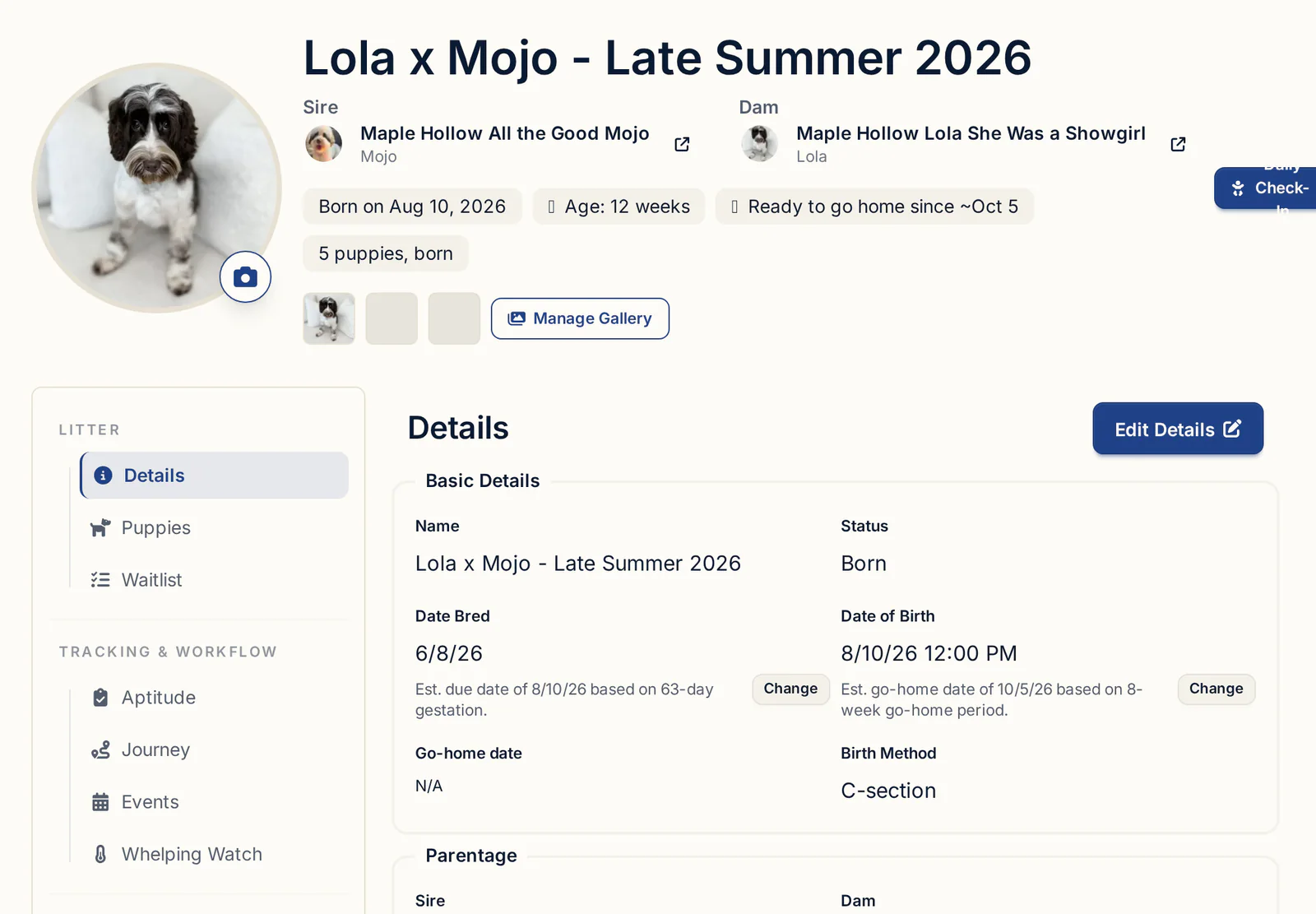
The litter shows an estimated due date under Date Bred, 61 days by default. Click Change to set your own gestation length. If you applied ovulation timing, BreederBuddy also shows a refined due date at ovulation plus 63 days. On the calendar the due date appears as an "Est. Birth" event with the litter's name, and she shows as pregnant on the Litter Planner.
Bred her more than once? Log each tie or insemination with its own Log Breeding. They all list under Breedings This Cycle. The litter keeps one Date Bred, so enter the date you want the due date counted from.
As the date gets close, log her temperatures on the Whelping Watch tab. Here's how to read the temperature drop before labor.
Care schedules from birth to go-home
A care schedule is your litter care schedule written once and reused, so every litter gets the same protocol without retyping it.
What goes on it week by week is your call with your vet. A common shape: dewclaws checked in the first days, eyes opening around two weeks, dewormings every two weeks starting around two weeks, weaning beginning around three to four weeks, first vaccines and a vet check around six to eight weeks, microchips before go-home. Our week-by-week puppy deworming and vaccination schedule goes into the detail, and the products and timing should always be confirmed with your vet.
To build one:
- Go to Care Schedules (under Events) and click Create Care Schedule.
- Pick a starter template, like puppy vaccination and deworming or socialization, and click Use this template. Or choose Start from a blank care schedule, give it a Schedule Name, and set the Type to Litter.
- Review the tasks. Untick what you don't use, rename tasks, and set Days from start to match your protocol. Count weeks in days: week 2 is 14, week 4 is 28, week 6 is 42.
- Add each dose as its own task with Add New Task ("Deworming, week 2" at 14, "Deworming, week 4" at 28), so each gets its own reminder.
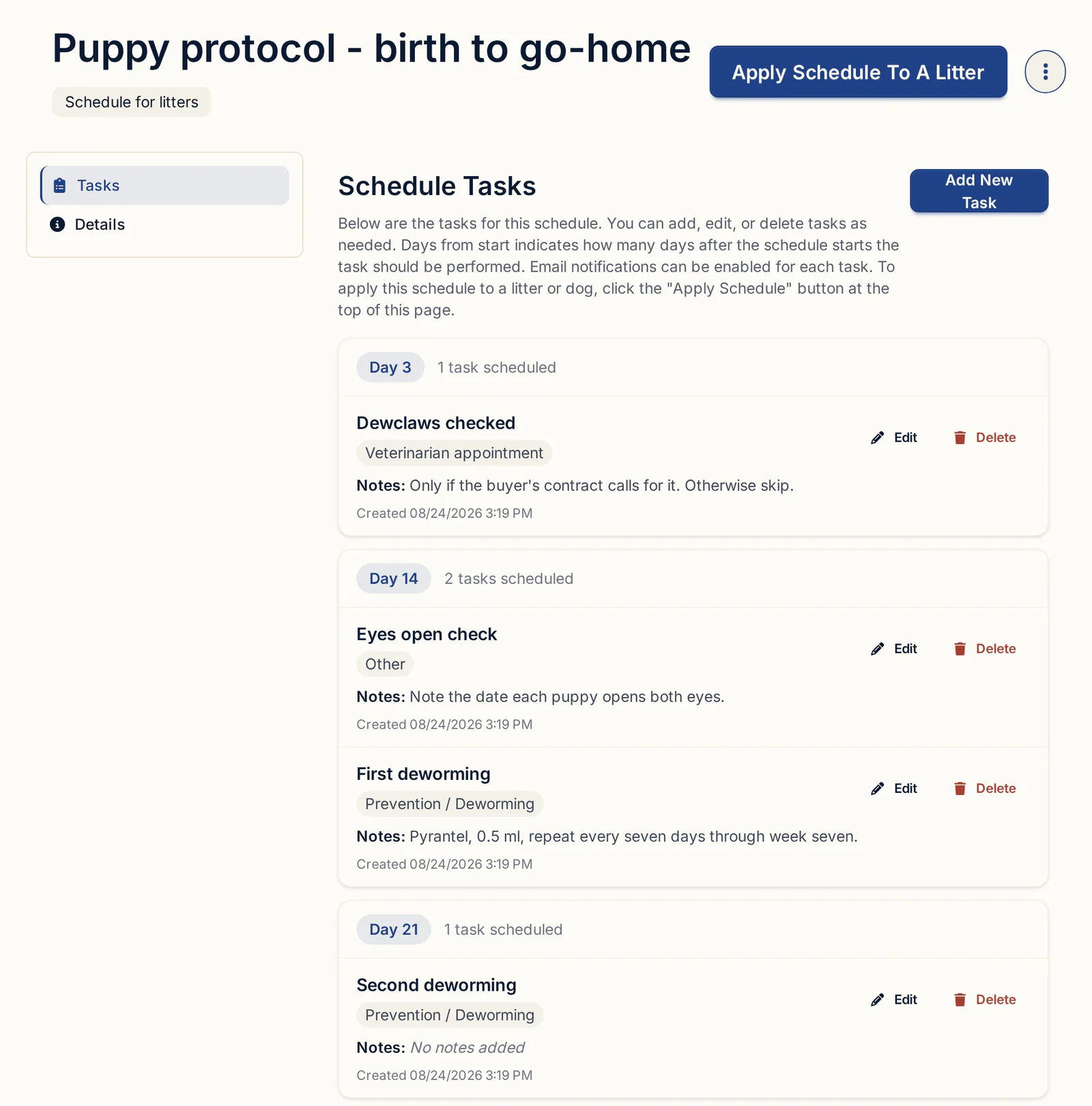
Schedules never apply themselves. When the litter is born, open its Events tab and click Apply Schedule to this Litter, then set the Start Date to the whelping date. That's Day 0. Every task becomes an event on the litter and on the main calendar, in the color of its Task Type. Each event uses the time of day from the Start Date, so set it to 8:00 AM if you want morning reminders. Litter tasks sit on the litter, not on each puppy.
If you need different start dates for different adult dogs, apply a Dog schedule from each dog's Events tab rather than using Apply Schedule To Dogs, which gives everyone one date.
Reminders and recurring care
Email reminders are set per event or per task, and recurring adult care belongs on the calendar rather than in a care schedule.
- Calendar events: tick Email Reminder? and choose when to Send the reminder, from the event time up to a week before. The email goes to your account address.
- Care schedule tasks: tick Email Notification? on the task. It sends one email at the event's start time, to the person who created that task on the schedule. If a kennel helper should get the deworming reminders, have them add those tasks while signed in to their own login.
- Monthly or yearly care: click New Event, link it to the dog with Associate With, tick Recurring Event?, and set Repeat every and Frequency (for example, 1 and Month(s) for heartworm prevention).
- Follow-ups after a health record: when you log a vaccine, deworming, test or vet visit, click Yes, Create Follow-up. The suggested date is 2 weeks for deworming, 1 year for vaccines, tests and vet visits, and 6 months for anything else. You can change the date before saving.
If you'd rather get alerts from your phone's own calendar, Sync to Calendar subscribes Apple Calendar, Google Calendar or Outlook to your BreederBuddy calendar. Apple usually picks up changes within an hour. Google and Outlook can take several hours.
Reading the calendar day to day
Use Month view to plan and Agenda view to work through the week.
The calendar has Month, Week, Day and Agenda views. Month shows the shape of things: a heat bar here, a fertile window there, a cluster of puppy tasks. Agenda lists every event by date and time, which is the view to keep open on whelping-room mornings.
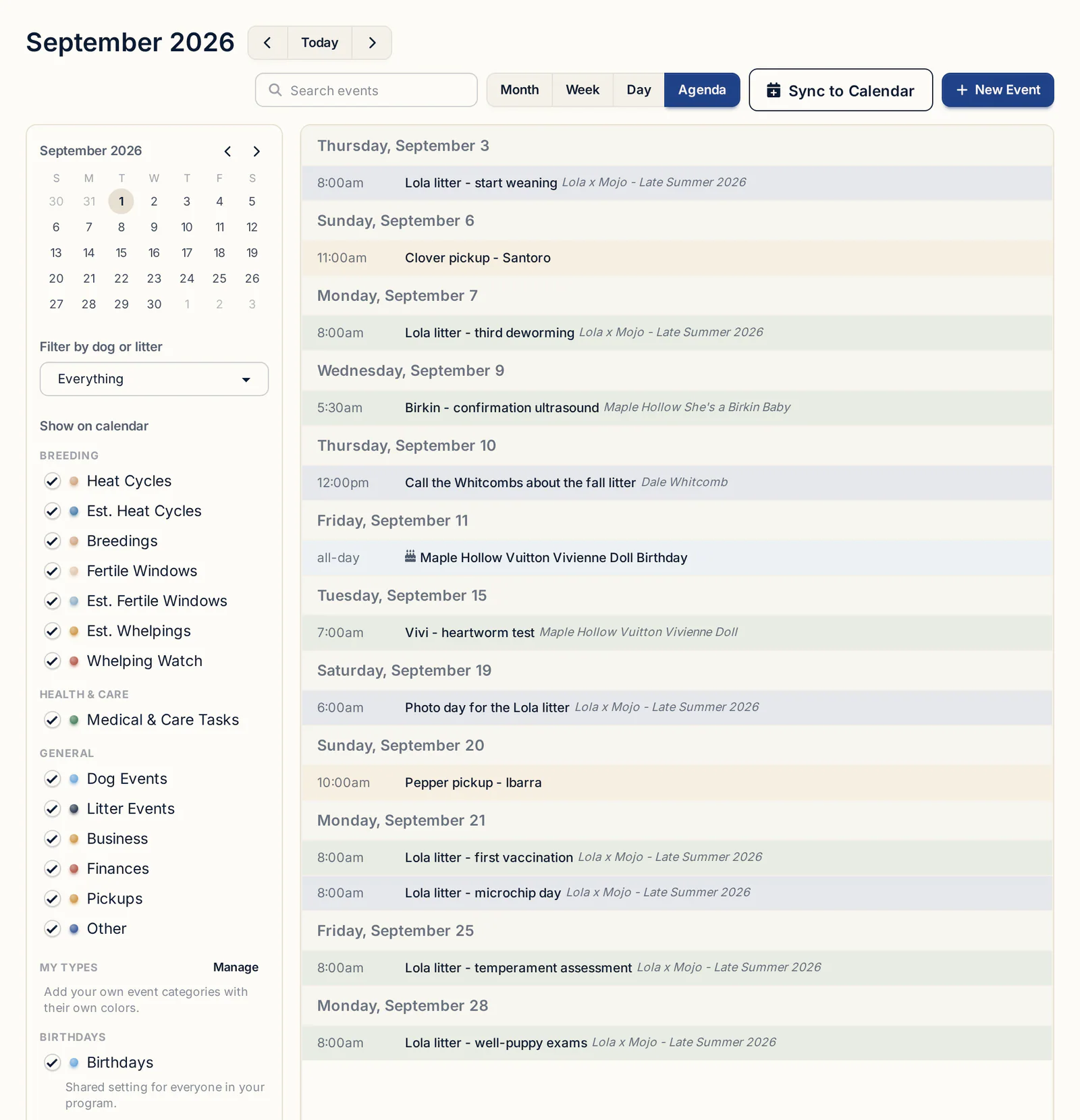
Each event's color comes from its Type, such as Medical, Litter, Business or Pickup, and the dots in the Show on calendar panel are the key. You can't pick custom colors. To cut the noise:
- Untick Birthdays to hide dog birthdays.
- To see only due dates, untick everything except Est. Whelpings under Breeding.
- Pick one dog or litter in the dropdown at the top of the panel (it starts on Everything).
- Click Show all to bring it back.
Go-home days appear on their own, as "[litter name] puppies go home", using the litter's go-home date or an estimate from birth marked est. until you set one. The puppy go-home date calculator helps if you're deciding on a date.
Common calendar mistakes
Most calendar problems come from a record that's missing or out of date, not from the calendar itself.
- Too few heats logged. One cycle means a 180-day guess. Add her past heats.
- Irregular cycles treated as fixed. A girl who skips or runs long will drift from her projection. Log the real start each time.
- A breeding with no litter. A breeding record alone doesn't create a due date. If you skipped Create the litter, BreederBuddy offers Create Litter From Breeding when you complete the pregnancy check reminder.
- Applying a schedule before birth. Care tasks are dated from the Start Date you pick and don't move afterward. Apply on whelping day. If you used the wrong date, open one of the events and click Delete All Tasks From This Schedule, then apply again with the right date.
- Duplicate tasks. Applied a schedule twice? The same Delete All Tasks From This Schedule button removes one full copy and leaves the other.
- Stale tasks from old litters. Mark them Complete or delete them in bulk, and tick Upcoming Only on the Events tab to hide the past.
- Editing events instead of the template. If your protocol changes, edit the schedule's Tasks tab. Pending events on litters it's applied to update too. Completed events are never touched.
What to look for in a kennel calendar
Hold any calendar or breeding app against these:
- Heats and fertile windows drawn from the female's own records
- Next-heat projections based on her history, not a fixed six months
- A due date that follows the litter's breeding date
- A view of every breeding female's year on one screen
- Reusable puppy protocols counted from the whelping date
- Per-event email reminders and recurring events
- Filters by event type and by dog or litter
- A feed you can subscribe to from your phone's calendar
Getting started
The calendar, Litter Planner, heat cycles and care schedules are on every plan, starting with Standard at $30/month or $300/year. Pro, at $60/month or $600/year, adds a kennel website built from the same records. Every plan starts with a 30-day free trial, and no credit card is required.
Questions
How do I keep track of my dogs' heat cycles and due dates?
Log each heat on the female's Heat Cycles tab with its start date. Her fertile window and projected next heat appear on the calendar. When she's bred, log the breeding and click Create the litter. The litter's Date Bred puts an estimated due date on the calendar and marks her pregnant on the Litter Planner.
How many days after breeding is a dog due?
Gestation is about 63 days from ovulation, and more variable counted from a breeding date. BreederBuddy estimates the due date at 61 days from Date Bred by default, which you can change, and shows a refined date at ovulation plus 63 days if you've applied progesterone ovulation timing. Confirm timing with your vet.
Can I set a puppy deworming schedule to repeat for every litter?
Yes. Build it once as a Litter care schedule with one task per dose (for example days 14, 28, 42 and 56), then apply it to each new litter with the whelping date as the Start Date. Every task becomes a calendar event for that litter.
What's the best calendar app for dog breeders?
Look for one that draws heats, fertile windows and due dates from your records, projects heats from each female's own history, reuses puppy protocols, sends email reminders and syncs to your phone. BreederBuddy's calendar does those things; hold any option against the same list and judge for yourself.
How far ahead can I plan litters?
The Litter Planner forecasts 3 or 4 heat cycles ahead for each active breeding female and can show a 12-month timeline. Projections come from her logged heats, so the more past cycles you record, the more useful the long view gets.
What happens to care tasks if the whelp date changes?
Care schedule tasks are dated from the Start Date you choose when you apply the schedule, and they don't move on their own. Apply the schedule after the litter is born. If you used the wrong date, click Delete All Tasks From This Schedule on one of the events and apply it again.
Terms used in this article
- Fertile window
- The days in a heat cycle when a breeding is most likely to take, often estimated as roughly days 9 to 14 after the heat starts.
- LH surge
- The hormone spike that triggers ovulation about two days later, usually seen as progesterone rising to around 2 to 3 ng/mL.
- Progesterone test
- A blood test used to time ovulation in a female dog; ovulation typically shows at around 5 ng/mL.
- Gestation
- The length of pregnancy, about 63 days from ovulation in dogs, with more variation when counted from the breeding date.
- TCI
- Transcervical insemination, a non-surgical artificial insemination method that places semen through the cervix into the uterus.
- Go-home day
- The date a puppy leaves for its new home, commonly around eight weeks of age depending on breed and program.
- Care schedule
- A reusable list of timed tasks, like dewormings and vet checks, counted in days from a start date such as the whelping date.
In BreederBuddy
- Standard
- $30/month or $300/year. The full management platform: unlimited dogs, litters, and puppies, and multiple user accounts.
- Pro
- $60/month or $600/year. Everything in Standard, plus a template kennel website built from your records.
- Platforms
- Available on the web and as an Android app on Google Play (iPhone and iPad app coming soon).
- Free trial
- 30 days, full access, no credit card required.