
Whelping Watch: Know When Your Dog Is Going Into Labor
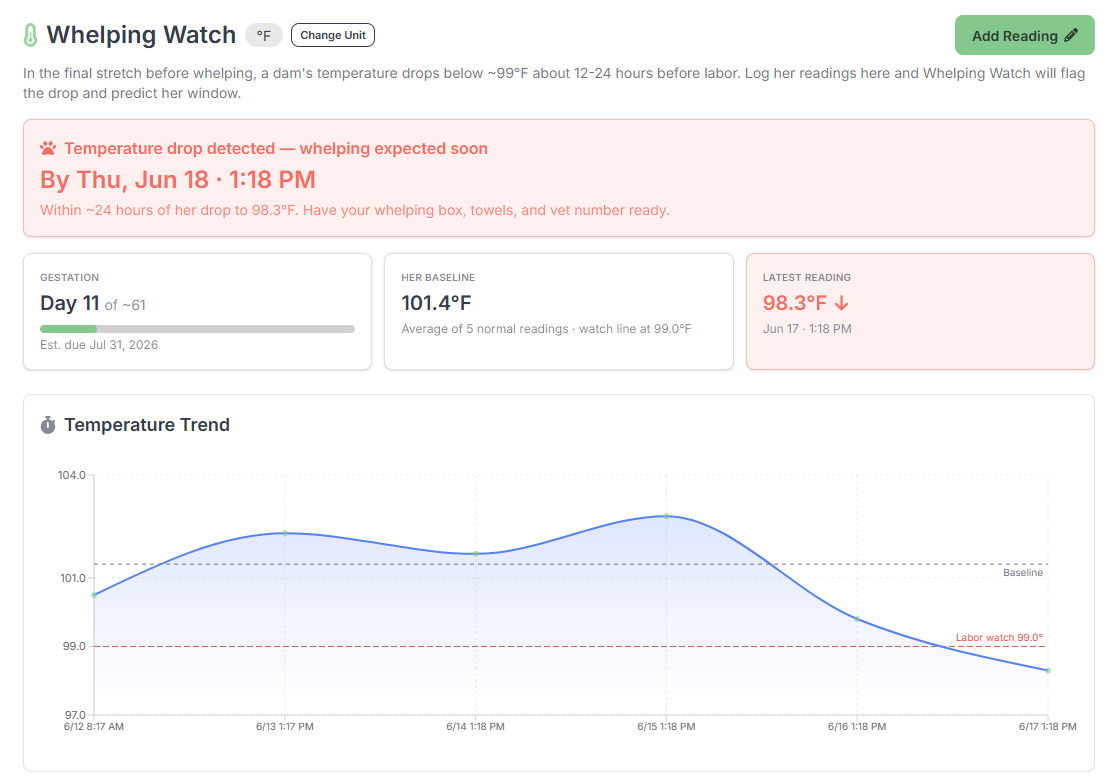
The temperature drop is the most reliable sign that puppies are coming. Breeders have known this for decades, which is why so many of us end up taking the dam's temperature two or three times a day in her last week and scribbling it on a notepad taped to the whelping box.
Now it lives in BreederBuddy, and the app watches for the drop for you.
What the temperature drop tells you
For most of her pregnancy a dam's resting temperature sits around 101°F. About 12 to 24 hours before labor it falls below 99°F, sometimes down to 98. That dip is your cue to clear your schedule, set up the whelping box, and stay close. Miss it and you can miss the start of labor.
The hard part has never been the idea. It's the discipline of logging every reading, remembering her normal range, and noticing the drop at 6am when you're half awake.
How Whelping Watch works
Open a female's profile, go to the Whelping Watch tab, and log her temperature. Each reading takes a few seconds: the temperature, the date and time, and a note if you want one. As the readings stack up, the app draws her trend and learns her normal baseline.
You get:
- A temperature log in °F or °C, her choice of unit
- A trend line with her baseline and the 99°F labor line marked right on it
- Her own baseline, averaged from her normal readings instead of a generic number
- A plain note on every entry that tells you what the reading means
It catches the drop and starts the clock
When a reading falls below 99°F, or a full degree under her baseline, Whelping Watch flags it. A red banner tells you labor is expected within about 24 hours, by a specific date and time. It also adds a "Whelping Watch" event to your calendar so the rest of your week plans around it.
No mental math. No second-guessing whether 99.2 counts.
It knows where she is in her pregnancy
If the litter has a breeding date, Whelping Watch shows her gestation day next to the trend. Day 60 of about 63. So you're reading the drop against where she actually is, not guessing from memory.
Just ask Buddy
Buddy, the assistant built into BreederBuddy, reads straight from your data. Ask "has Birken's temp dropped?" and you get her latest reading, her baseline, and whether labor's close, without even opening her profile.
On the litter and the printable
Every reading ties to the litter, so the temperature history lands on the litter's printable overview right alongside the weights and the puppy roster. Hand your vet or your whelping helper one page and it's all there.
Part of BreederBuddy
Whelping Watch is included for every program, dogs and cats. It sits in the same place as heat cycles, weights, and health records, so the whole reproductive picture for a female stays on one profile.
No spreadsheet taped to the wall.